Cheerio or Puppeteer: Which Is Better for Web Scraping in 2026?
Introduction
Comparing Cheerio and Puppeteer is a classic apples-to-oranges question in web scraping: one is a lightweight HTML parser that runs entirely in memory, while the other is a full headless browser automation library that renders real pages and executes JavaScript.
Because they operate at fundamentally different layers of the scraping stack, they're not direct competitors — they're tools for completely different kinds of targets.
This guide explains the exact mechanical differences between them, when to reach for each, and how production systems combine both for maximum speed and cost efficiency.
Quick Comparison
| Feature | Cheerio | Puppeteer |
|---|---|---|
| What it is | HTML parser (in-memory) | Headless browser (Chromium) |
| JavaScript execution | ✗ No (static HTML only) | ✓ Yes (full V8 engine) |
| Speed | Extremely fast (~1–5ms/page) | Slower (~500–3000ms/page) |
| Memory footprint | ~5–20 MB per process | ~150–500 MB per browser |
| CPU usage | Very low | Moderate to high |
| Anti-bot bypass | Minimal (headers only) | Advanced (fingerprints, CAPTCHA) |
| SPA support (React/Vue) | ✗ No (unless server-rendered) | ✓ Yes |
| Cost per 10k pages | Fractions of a cent | Several dollars (compute) |
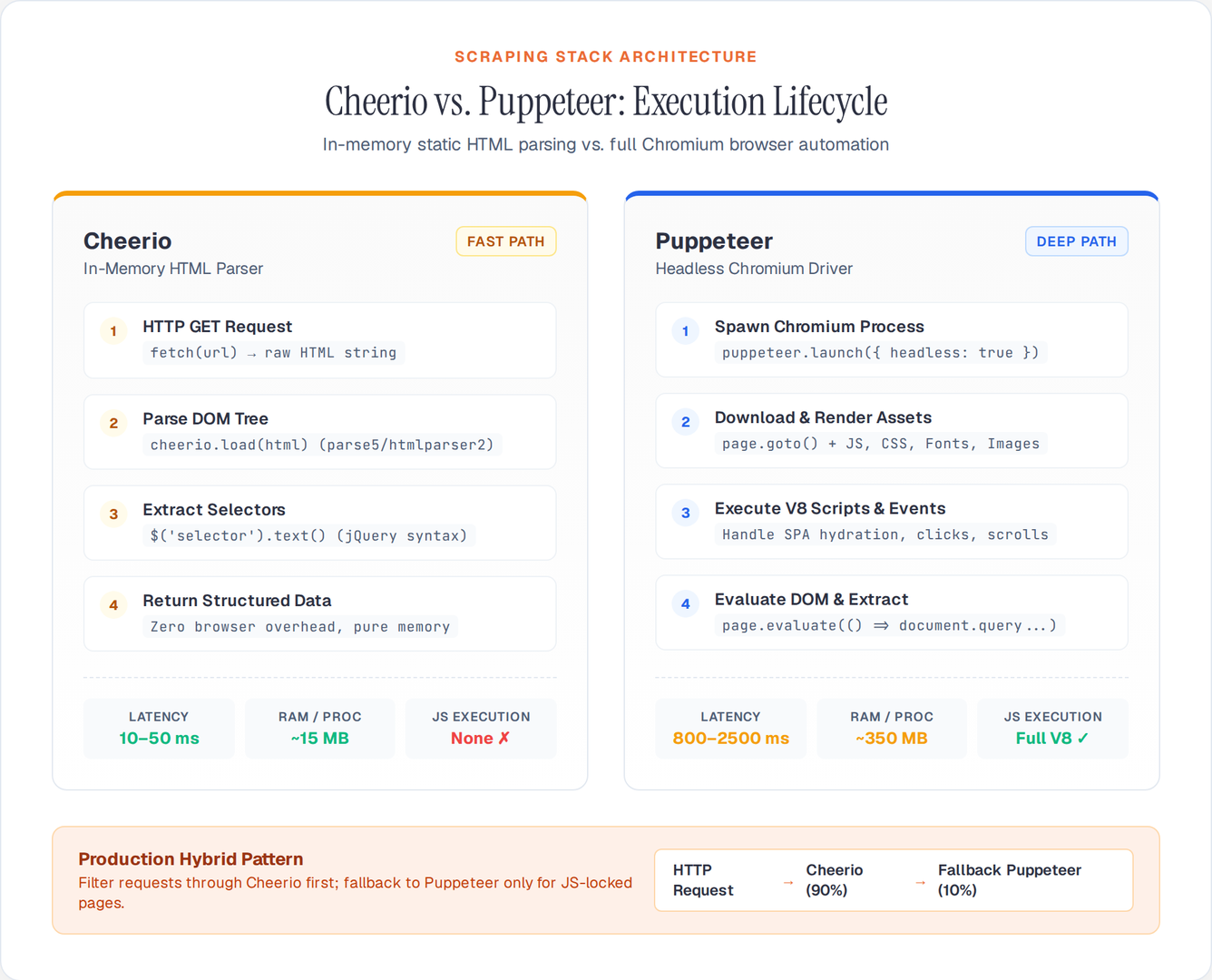
The Fundamental Difference: Parser vs. Browser
How Cheerio Works
Cheerio takes a raw HTML string and parses it into a DOM tree using a fast HTML parser (like parse5 or htmlparser2). It provides a jQuery-compatible API to traverse and extract data from that tree.
Cheerio never connects to the internet on its own. You fetch HTML using fetch(), axios, or undici, then pass the resulting string to Cheerio:
import * as cheerio from 'cheerio';

// Step 1: Fetch raw HTML over HTTP
const response = await fetch('https://example.com/products');
const html = await response.text();

// Step 2: Parse and query in memory (microseconds)
const $ = cheerio.load(html);
const title = $('h1').text();
const prices = $('.price').map((_, el) => $(el).text()).get();
Because Cheerio doesn't run a browser, it cannot execute JavaScript. If a page loads its content dynamically via client-side API calls after the initial HTML lands (like most single-page applications), Cheerio only sees the empty shell.
How Puppeteer Works
Puppeteer launches a real instance of Chromium in the background. It navigates to a URL, downloads all resources (HTML, CSS, JS, images), runs the page's JavaScript in Chromium's V8 engine, renders the DOM, and executes layout calculations:
import puppeteer from 'puppeteer';

// Step 1: Launch full browser process (~200ms)
const browser = await puppeteer.launch({ headless: true });
const page = await browser.newPage();

// Step 2: Navigate and wait for client-side JS to execute
await page.goto('https://example.com/products', { waitUntil: 'networkidle2' });

// Step 3: Extract rendered DOM data
const products = await page.evaluate(() => {
  return Array.from(document.querySelectorAll('.product-card')).map(card => ({
    title: card.querySelector('h2')?.textContent,
    price: card.querySelector('.price')?.textContent
  }));
});

await browser.close();
Because Puppeteer is a real browser, it sees exactly what a human user sees on screen, regardless of how complex the client-side JavaScript is.
When to Use Cheerio
Use Cheerio whenever the target data is already present in the initial HTTP response.
Ideal Use Cases
- Server-Rendered Websites (SSR): Traditional CMSs (WordPress, Drupal), blogs, news sites, e-commerce platforms with SSR (Next.js, Nuxt.js SSR output), and Wikipedia.
- High-Volume Crawling: Scraping millions of pages where resource consumption and speed are critical.
- Public APIs or Structured Feeds: Sites where data is embedded in JSON-LD scripts, OpenGraph tags, or static meta blocks in the raw HTML.
- Low-Resource Environments: Serverless functions, micro-containers, or cheap VPS instances where running headless Chromium is cost-prohibitive.
Cheerio Code Example: Static E-Commerce Scraper
import * as cheerio from 'cheerio';

async function scrapeCategoryPage(url) {
  const response = await fetch(url, {
    headers: {
      'User-Agent': 'Mozilla/5.0 (Windows NT 10.0; Win64; x64) AppleWebKit/537.36'
    }
  });

  if (!response.ok) throw new Error(`HTTP ${response.status}`);
  const html = await response.text();
  const $ = cheerio.load(html);

  const products = [];
  $('.product-item').each((_, el) => {
    const $item = $(el);
    products.push({
      id: $item.attr('data-product-id'),
      name: $item.find('.product-title').text().trim(),
      price: parseFloat($item.find('.price-current').text().replace(/[^0-9.]/g, '')),
      inStock: !$item.hasClass('out-of-stock'),
      url: $item.find('a.product-link').attr('href')
    });
  });

  return products;
}
When to Use Puppeteer
Use Puppeteer when the data cannot be retrieved from raw HTML.
Ideal Use Cases
- Single-Page Applications (SPAs): Client-rendered React, Vue, Angular, or Svelte apps that fetch data via background GraphQL/REST requests and render purely on the client.
- User Interaction Required: Sites requiring clicks to expand accordions, infinite scrolling, filling search forms, or navigating behind login screens.
- PDF Generation and Full-Page Screenshots: Taking high-resolution screenshots or converting pages to PDF.
- Anti-Bot and Fingerprint Challenges: Sites using Cloudflare Turnstile, DataDome, or Akamai where full browser fingerprints and behavioral heuristics are inspected.
Puppeteer Code Example: Infinite Scroll Scraper
import puppeteer from 'puppeteer';

async function scrapeInfiniteScroll(url, maxScrolls = 5) {
  const browser = await puppeteer.launch({ headless: true });
  const page = await browser.newPage();

  // Optimize by blocking heavy media
  await page.setRequestInterception(true);
  page.on('request', req => {
    if (['image', 'stylesheet', 'font', 'media'].includes(req.resourceType())) {
      req.abort();
    } else {
      req.continue();
    }
  });

  await page.goto(url, { waitUntil: 'domcontentloaded' });

  let previousHeight = 0;
  for (let i = 0; i < maxScrolls; i++) {
    const currentHeight = await page.evaluate('document.body.scrollHeight');
    if (currentHeight === previousHeight) break;

    await page.evaluate('window.scrollTo(0, document.body.scrollHeight)');
    await page.waitForNetworkIdle({ idleTime: 500, timeout: 5000 }).catch(() => {});
    previousHeight = currentHeight;
  }

  const items = await page.evaluate(() => {
    return Array.from(document.querySelectorAll('.feed-item')).map(item => ({
      author: item.querySelector('.author-name')?.textContent?.trim(),
      content: item.querySelector('.post-body')?.textContent?.trim(),
      timestamp: item.querySelector('time')?.getAttribute('datetime')
    }));
  });

  await browser.close();
  return items;
}
Resource and Cost Comparison
To understand why Cheerio is preferred whenever possible, look at the infrastructure requirements for 100,000 pages:
| Metric | Cheerio (via HTTP) | Puppeteer (Headless Chrome) |
|---|---|---|
| Average time per page | ~50ms | ~2,000ms |
| Total compute time | ~1.4 hours | ~55.5 hours |
| RAM required (parallel=20) | ~100 MB | ~3–6 GB |
| Estimated AWS Lambda cost | < $0.05 | ~ $2.50–$5.00 |
| Proxy bandwidth usage | Small (HTML only) | Large (JS, styles, API calls) |
The Pro Pattern: The Hybrid Architecture
In production scraping systems in 2026, the best architecture rarely picks only one. Instead, high-scale scrapers use a two-tier or hybrid model:
- Fast-path first (Cheerio): Try to fetch the page with plain HTTP. Check if the required elements exist in the raw HTML or in embedded
<script type="application/ld+json">tags. - Inspect hidden APIs: Often, what looks like dynamic content is loaded from a clean, unauthenticated JSON API. Use the browser's Network tab to find the API endpoint and fetch it directly with
fetch()+JSON.parse(), bypassing both Cheerio and Puppeteer. - Slow-path fallback (Puppeteer): Only launch headless Chromium if the page genuinely requires JS execution, complex interaction, or session-based cookies.
Incoming URL
     │
     ▼
Try plain HTTP request
     │
     ├── Data in HTML? ───► YES ──► Parse with Cheerio (Fast path: ~50ms)
     │
     ├── Data in JSON API? ► YES ──► Fetch API directly (Fastest path: ~20ms)
     │
     └── Dynamic/Blocked? ─► YES ──► Launch Puppeteer (Fallback: ~1500ms)
Summary Recommendation
- Default to Cheerio for static sites, high-volume batch jobs, and when scraping on low-memory servers or serverless functions.
- Use Puppeteer when you must interact with the page, scroll infinitely, solve client challenges, or when the data only exists after client JavaScript executes.
- Always check for internal APIs first before firing up a full browser — 80% of "dynamic" sites can be scraped faster by querying their backend JSON endpoints directly.
Author

Author