Essential Python Coding Tips for Handling Errors and Exceptions Gracefully (2026 Guide)
Every Python developer encounters exceptions. Network requests time out, JSON payloads arrive malformed, and databases drop connections. These situations don't mean you've written bad code—they're inevitable realities of distributed systems. The difference between amateur scripts and production-grade applications lies entirely in how those exceptions are handled.
Modern Python provides robust, expressive tools for managing failures. With recent features like ExceptionGroups (introduced in Python 3.11) and the maturation of type hinting in the 2026 ecosystem, exception handling has evolved from simple try-except blocks into a comprehensive error management strategy.
This guide covers essential techniques for writing resilient Python code, moving from basic syntax to advanced concurrency error handling.
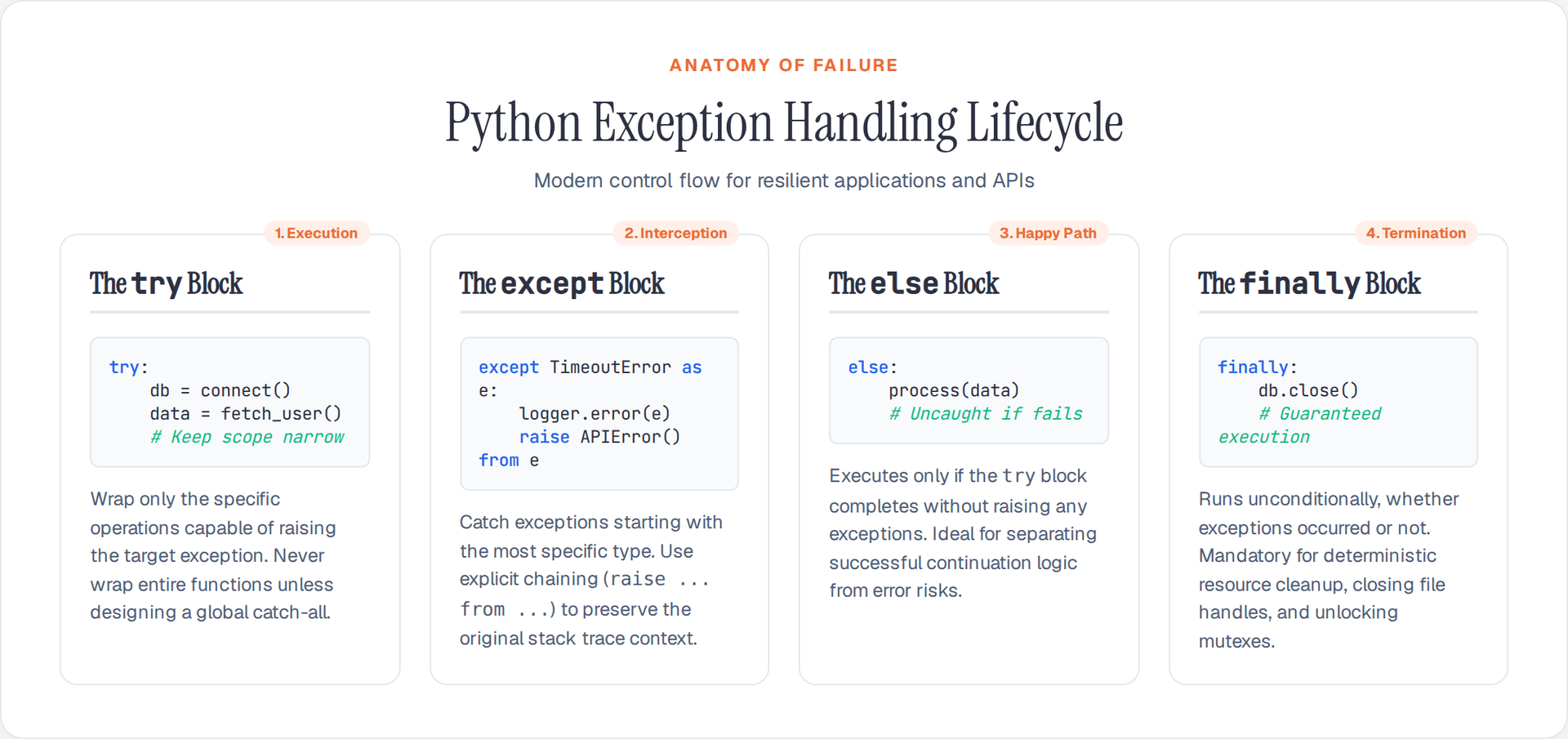
1. The Anatomy of Modern try-except Blocks
The try-except construct forms the foundation of Python error handling. However, the days of bare except: clauses are long gone. Modern Python demands specificity and scoping.
Key principles for try-except blocks:
- Keep the try block minimal: Only wrap the specific lines that might raise the exception you're catching.
- Never use bare exceptions: Catching
Exceptionwithout a highly specific reason masks bugs likeNameErrororTypeError. - Catch the most specific exception first: Exception matching works top-down.
import httpx
import json

def fetch_and_parse_user(user_id: int) -> dict:
    # ❌ Bad: Massive try block, catches everything
    try:
        url = f"https://api.example.com/users/{user_id}"
        response = httpx.get(url, timeout=5.0)
        data = response.json()
        return data["user"]["profile"]
    except Exception as e:
        print(f"Error: {e}")
        return {}

    # ✅ Good: Narrow try blocks, specific exceptions
    url = f"https://api.example.com/users/{user_id}"

    try:
        response = httpx.get(url, timeout=5.0)
        response.raise_for_status()
    except httpx.TimeoutException:
        raise UserFetchError("Connection timed out") from None
    except httpx.HTTPError as e:
        raise UserFetchError(f"HTTP error occurred: {e.response.status_code}") from e

    try:
        return response.json()["user"]["profile"]
    except (json.JSONDecodeError, KeyError) as e:
        raise UserParseError("Malformed response structure") from e
2. Using else and finally for Control Flow
The else and finally clauses extend try-except functionality and help separate "happy path" logic from cleanup code.
The else block executes only when the try block completes without raising an exception. It's the perfect place for code that should only run if the risky operation succeeded, but which shouldn't be caught by the preceding except blocks.
The finally block runs regardless of whether an exception occurred. It is meant for deterministic cleanup (closing files, releasing locks, closing connections).
def process_data_file(filepath: str):
    file_handle = None
    try:
        file_handle = open(filepath, 'r')
        data = parse_complex_format(file_handle.read())
    except FileNotFoundError:
        logger.error(f"Missing file: {filepath}")
    except ParseError as e:
        logger.error(f"Corrupt data: {e}")
    else:
        # Runs only if no exception occurred above
        # If write_to_db raises an error, it will NOT be caught by the except blocks above
        write_to_db(data)
        logger.info("Processing complete")
    finally:
        # Runs unconditionally, even if write_to_db threw an exception
        if file_handle:
            file_handle.close()
            logger.debug("File closed")
3. Explicit Exception Chaining
When handling an exception, you often want to raise a different, domain-specific exception. But throwing a new exception normally loses the original stack trace. Python's raise ... from ... syntax explicitly chains exceptions, preserving the context for debugging.
try:
    db.execute("SELECT * FROM users")
except sqlite3.OperationalError as e:
    # ❌ Bad: Loses the sqlite3 stack trace
    raise DatabaseError("Query failed")

    # ✅ Good: Explicitly chains the new exception to the root cause
    raise DatabaseError("Query failed") from e

    # ⚠️ Deliberate masking: Hides the root cause (useful for security/API boundaries)
    raise DatabaseError("An internal error occurred") from None
4. Crafting Domain-Specific Custom Exceptions
Relying solely on built-in exceptions like ValueError makes it difficult for calling code to distinguish between an invalid input string and a failed business rule. Modern codebases define clear exception hierarchies subclassing Exception.
class PaymentError(Exception):
    """Base exception for all payment-related errors."""
    pass

class InsufficientFundsError(PaymentError):
    def __init__(self, required: float, available: float):
        self.required = required
        self.available = available
        self.shortfall = required - available
        super().__init__(f"Transaction declined: Shortfall of ${self.shortfall:.2f}")

class GatewayTimeoutError(PaymentError):
    def __init__(self, retry_after: int = 30):
        self.retry_after = retry_after
        super().__init__(f"Gateway timeout. Retry after {retry_after}s")
By inheriting from a base PaymentError, callers can either catch all payment issues broadly (except PaymentError:) or handle specific cases precisely (except InsufficientFundsError:).
5. Context Managers: The Pythonic Cleanup
While finally blocks work, they require boilerplate and are easy to forget. Context managers (the with statement) encapsulate setup and teardown logic reliably.
In 2026, the contextlib module is the standard way to create these without writing full class definitions.
from contextlib import contextmanager
import os

@contextmanager
def temporary_environment(**kwargs):
    """Temporarily modifies environment variables, restoring them afterward."""
    original_env = {k: os.environ.get(k) for k in kwargs}
    os.environ.update(kwargs)

    try:
        yield
    finally:
        for k, v in original_env.items():
            if v is None:
                os.environ.pop(k, None)
            else:
                os.environ[k] = v

# Usage:
with temporary_environment(API_KEY="test_key", DEBUG="1"):
    run_tests()
# Environment variables revert automatically here, even if run_tests() crashes.
6. Managing Concurrency with ExceptionGroups
Handling errors gets significantly harder in asynchronous code. If using asyncio.gather() to run concurrent tasks, multiple tasks might fail simultaneously. Before Python 3.11, gather would surface only the first exception.
ExceptionGroup and the except* (except-star) syntax solve this by allowing you to catch and handle multiple exceptions simultaneously.
import asyncio

async def fetch_urls():
    tasks = [
        fetch("https://api.example.com/1"),
        fetch("invalid-url"),
        fetch("https://api.example.com/timeout")
    ]

    # return_exceptions=True prevents gather from aborting on the first error
    results = await asyncio.gather(*tasks, return_exceptions=True)

    errors = [r for r in results if isinstance(r, Exception)]
    if errors:
        raise ExceptionGroup("Multiple fetch failures", errors)

async def main():
    try:
        await fetch_urls()
    except* ValueError as e:
        print(f"Handled {len(e.exceptions)} ValueErrors (e.g., bad URLs)")
    except* TimeoutError as e:
        print(f"Handled {len(e.exceptions)} TimeoutErrors")
The except<em> syntax allows multiple* except blocks to execute for a single ExceptionGroup if their sub-exceptions match different types.
Error Handling is API Design
Error handling is not an afterthought—it represents your application's API boundary. Building strong exception hierarchies, using context managers for resource safety, and leveraging explicit chaining transforms untraceable crashes into predictable, structured exits.
By applying these modern techniques, your Python applications will become vastly easier to debug, significantly more reliable in production, and more respectful of the developers who integrate with your code.
Author

Author