Top Python Automation Scripts You Should Know in 2026
Python automation has evolved dramatically. A few years ago, "automation" meant writing a fifty-line script with BeautifulSoup to scrape a static HTML page, or using smtplib to send a plaintext email. In 2026, those tasks are either handled natively by no-code tools or require significantly more robust solutions to deal with dynamic JavaScript frameworks, AI-driven data extraction, and strict API rate limits.
Today, Python automation is about composing powerful libraries—like Playwright for headless browser control, LLM APIs for unstructured data parsing, and asynchronous task runners for speed.
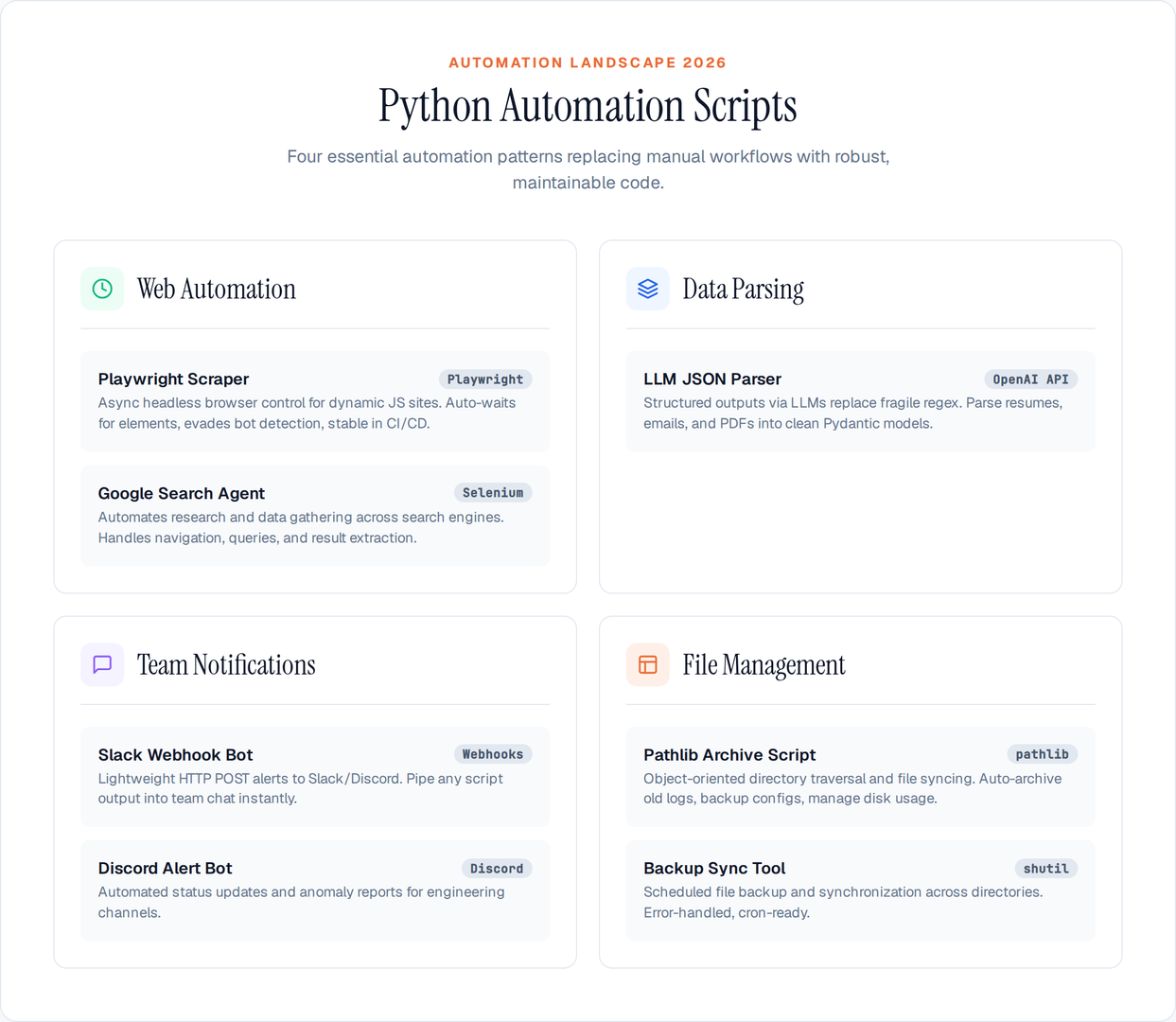
Here are the top Python automation scripts and patterns you should know to stay productive in 2026.
1. The Headless Browser Scraper (Using Playwright)
Basic requests and BeautifulSoup scripts fail on modern websites that require JavaScript execution to render content. The modern standard for web automation is Playwright.
Unlike the older Selenium implementations, Playwright is natively asynchronous, auto-waits for elements to appear, and easily evades basic bot detection.
The Script Pattern:
Instead of manually configuring web drivers, you can launch a headless Chromium instance, navigate to a dynamic page, wait for the network to idle, and extract JSON or text directly from the DOM.
import asyncio
from playwright.async_api import async_playwright

async def scrape_dynamic_data():
    async with async_playwright() as p:
        browser = await p.chromium.launch(headless=True)
        page = await browser.new_page()
        await page.goto('https://example.com/data', wait_until='networkidle')

        # Auto-waits for the element to appear
        data_table = await page.inner_text('.data-container')
        print(data_table)

        await browser.close()

asyncio.run(scrape_dynamic_data())
Why this matters in 2026: Playwright scripts are incredibly stable in CI/CD environments. You can run them on a schedule via GitHub Actions to monitor prices, track inventory, or snapshot competitor sites without dealing with driver version mismatches.
2. LLM-Powered Unstructured Data Parsing
One of the most tedious manual tasks is parsing unstructured data—resumes, messy customer emails, or raw PDF text. Historically, developers wrote fragile regex patterns. Now, automation heavily relies on passing unstructured text to an LLM and demanding structured JSON back.
The Script Pattern:
Using structured outputs (via OpenAI or Anthropic's APIs or a library like instructor), you can automate the extraction of perfect JSON objects from chaotic inputs.
import instructor
from pydantic import BaseModel
from openai import OpenAI

client = instructor.patch(OpenAI())

class CustomerInquiry(BaseModel):
    category: str
    urgency_level: int
    summary: str

def parse_email(email_text: str) -> CustomerInquiry:
    inquiry = client.chat.completions.create(
        model="gpt-4o-mini",
        response_model=CustomerInquiry,
        messages=[
            {"role": "user", "content": f"Extract data from this email:\n{email_text}"}
        ]
    )
    return inquiry
Why this matters in 2026: This script eliminates hours of manual data entry. By piping a shared inbox through a script like this, support tickets can be automatically tagged, prioritized, and routed before a human ever sees them.
3. Slack/Discord Notification Bots
Email automation (smtplib) still exists, but modern professional workflows happen in Slack and Discord. Automating notifications for a failed build, a new Stripe sale, or a server health warning is a mandatory skill.
The Script Pattern:
Instead of heavyweight bots, use simple HTTP POST requests to incoming webhooks. It is the fastest way to pipe script outputs into your team's chat.
import requests
import json

def alert_slack(message: str, webhook_url: str):
    payload = {
        "text": f"🚨 *Alert*: {message}"
    }
    response = requests.post(
        webhook_url,
        data=json.dumps(payload),
        headers={'Content-Type': 'application/json'}
    )
    return response.status_code

# Usage
# alert_slack("Daily pipeline finished successfully.", "https://hooks.slack.com/services/...")
Why this matters in 2026: Webhooks allow any backend script to become visible to the business. A Python script that checks database constraints every morning can immediately ping the engineering channel if an anomaly is found.
4. Modern File Sync and Backup with pathlib
Writing custom scripts for file moving using os is outdated. Python's pathlib provides an elegant, object-oriented way to traverse directories, filter files by extension or age, and move them securely.
The Script Pattern:
A clean script to automatically archive log files or reports older than 30 days to a backup directory or cloud bucket.
from pathlib import Path
from datetime import datetime, timedelta
import shutil

def archive_old_files(src_dir: str, dest_dir: str, days_old: int):
source = Path(src_dir)
destination = Path(dest_dir)
destination.mkdir(parents=True, exist_ok=True)

cutoff_date = datetime.now() - timedelta(days=days_old)

for file_path in source.rglob('*.log'):
# Check modification time
mtime = datetime.fromtimestamp(file_path.stat().st_mtime)
if mtime < cutoff_date:
shutil.move(str(file_path), str(destination / file_path.name))
print(f"Archived {file_path.name}")
Why this matters in 2026: By wrapping this logic inside a cron job on a Linux server, you ensure that your disk usage never unexpectedly fills up from runaway logging or temporary processing files.
Summary
The difference between a basic Python script and a professional automation workflow lies in robustness. When writing automation in 2026, rely on Playwright for web interactions instead of outdated drivers, use LLMs via structured outputs to replace fragile regex, and use webhooks to report status back to your team.
The best automation scripts are the ones that run reliably in the background, outliving the machine they were originally written on.
Author

Author