Pandas out of memory? 3 ways to process large files
Cover Image

Your CSV loads, but the next merge kills the process. Or read_csv raises MemoryError before you can inspect a column. When pandas runs out of memory, start by finding which step exceeds the available RAM. Loading the input, creating intermediate results, and collecting the final output are different problems.
Keep pandas if selecting fewer columns, changing dtypes, or processing chunks solves the problem. Try DuckDB when the expensive work is easy to express in SQL. Try Polars when you want a DataFrame expression API with lazy execution. Neither tool promises that every operation will fit on your machine.
This guide covers those choices and shows how Parquet can help with repeated reads. The examples illustrate query structure, not benchmark results. There is no universal file-size threshold at which you must switch libraries: the schema, operations, output size, and process memory limit all matter.
Pandas out of memory: find the failing step
Pandas is designed for in-memory analysis. By default, read_csv returns a complete DataFrame, but it also supports reading selected columns and iterating over chunks. Its scaling guide describes these options alongside more efficient dtypes and alternative libraries.
A CSV's size on disk is not a reliable estimate of the RAM required to process it. Parsed column types, string representation, indexes, and intermediate allocations all affect memory use. There is no useful fixed multiplier that applies to every dataset.
Check where the failure occurs:
If input loading fails, select only the needed columns with
usecols, choose appropriate dtypes, or read in chunks.If a merge fails, check whether duplicate keys create a much larger result than expected. Changing libraries does not fix an unintended many-to-many join.
If a transformation fails, inspect the size of intermediate results and objects that remain in memory.
If execution succeeds but conversion to pandas fails, the final result may still be too large to materialize as a DataFrame.
For an existing DataFrame, df.memory_usage(deep=True).sum() estimates its memory footprint. It does not measure the peak memory of the entire process or the next operation. Also check container or job limits: the RAM installed in a machine may exceed what your process can use.
Chunking is a reasonable solution for work that combines cleanly across batches, such as counts or sums. Global sorting, joins, and distinct-value tracking need more care because their state can grow beyond one chunk. Rebuilding the full dataset with concat at the end can bring back the original problem.
If reducing the work inside pandas is not enough, move the expensive stage rather than rewriting the entire application.
DuckDB: query files with SQL
DuckDB is an analytical database that runs in-process and can query files directly. You do not need to create a pandas DataFrame before querying a CSV.
Assume a file named sales_2026.csv has a header, a text status column, a text region column, and a numeric amount column. Run this query in DuckDB's SQL interface:
-- Aggregate the file without first building a pandas DataFrame.
SELECT status, count(*) AS row_count, avg(amount) AS average_amount
FROM read_csv_auto('sales_2026.csv')
GROUP BY status;
Automatic CSV type detection is convenient for exploration. For a production feed, define and validate the expected schema rather than assuming every new file will infer the same types.
DuckDB supports spilling intermediate data to temporary storage for supported operations. That can make queries over datasets larger than RAM possible, but it is not a guarantee that every query will complete. Its larger-than-memory guidance explains blocking operators, spilling, and limitations.
Temporary disk space matters. So do the query's operators and the size of its intermediate state. A large join or aggregation can still fail; spilling does not guarantee that every query fits the available resources.
Keep the output boundary in view. Querying a large file and returning a small summary is different from querying it and calling .df() on millions of output rows. The second operation still has to create a pandas DataFrame in memory. Write a large result to a file, or reduce it further before conversion.
DuckDB is worth trying when SQL describes the failing step clearly. If your transformations are easier to maintain as DataFrame expressions, Polars offers another approach.
Polars: separate the query plan from execution
Polars has its own DataFrame API. It is not a drop-in replacement for pandas: expressions, column assignment, indexing, and some data-handling semantics differ.
A lazy query lets Polars optimize the work before executing it. Start with a scan rather than eagerly reading a file and only then calling .lazy().
Using the same assumed sales schema, this example filters shipped orders, sums their amounts by region, and writes the result to Parquet:
# Build a lazy query, then execute it by writing the result.
import polars as pl

query = (
    pl.scan_csv("sales_2026.csv")
    .filter(pl.col("status") == "shipped")
    .group_by("region")
    .agg(pl.col("amount").sum().alias("total_amount"))
)

query.sink_parquet("summary.parquet")
The query and the execution step are separate here. sink_parquet triggers the write; it is not merely another declaration of deferred work. Schema discovery can also involve reading input before the main query executes.
The scan_csv documentation describes projection and predicate pushdown. These optimizations can reduce the columns and rows carried into later operations. They do not give CSV the physical layout of Parquet: filtering a CSV does not generally mean the reader can skip directly to every matching record without scanning the text.
Polars' streaming engine can execute work in batches. Memory still depends on the query. Grouping by a column with many distinct values, large joins, sorting, and unsupported streaming operations can require substantial state or in-memory execution. Lazy evaluation alone does not impose a memory ceiling.
A file sink avoids explicitly collecting the entire output as a Python DataFrame, but it does not remove the memory requirements of upstream operations. Test your actual query rather than treating the word "streaming" as a capacity guarantee.
Both engines also work with Parquet, which can reduce repeated parsing and unnecessary column reads.
Convert reusable CSV data to Parquet
CSV stores records as text. Parquet stores typed data in a columnar format, so readers can select columns without reading every column's data. Supported filters can also use file metadata to skip some row groups, depending on how the data is organized.
Think of it as opening the relevant drawers in a filing cabinet instead of unpacking every box. That helps most when your query needs a small part of the stored data. It helps less when the task needs nearly everything.
For a simple conversion in DuckDB:
-- Write the CSV to a single Parquet file for subsequent queries.
COPY (
    SELECT * FROM read_csv_auto('sales_2026.csv')
)
TO 'sales_2026.parquet' (FORMAT PARQUET);
This example does not require a month column or a partitioning scheme. The conversion still consumes memory, CPU, and disk space. Check inferred types before treating the output as a durable dataset.
DuckDB's Parquet documentation explains reading, writing, and filter and projection pushdown. The benefit depends on selected columns, filter selectivity, compression, and file layout. No fixed speedup or reduction in bytes read applies to every workload.
Parquet does not make an oversized pandas result fit. Reading every column and every row into pandas still materializes that result. For repeated analysis, keep the larger dataset in Parquet and bring only the subset or summary you need into the notebook.
Partitioning can be useful when queries repeatedly filter on an appropriate field, but it adds layout decisions and can create many small files. Start with a simple layout unless your access pattern justifies more.
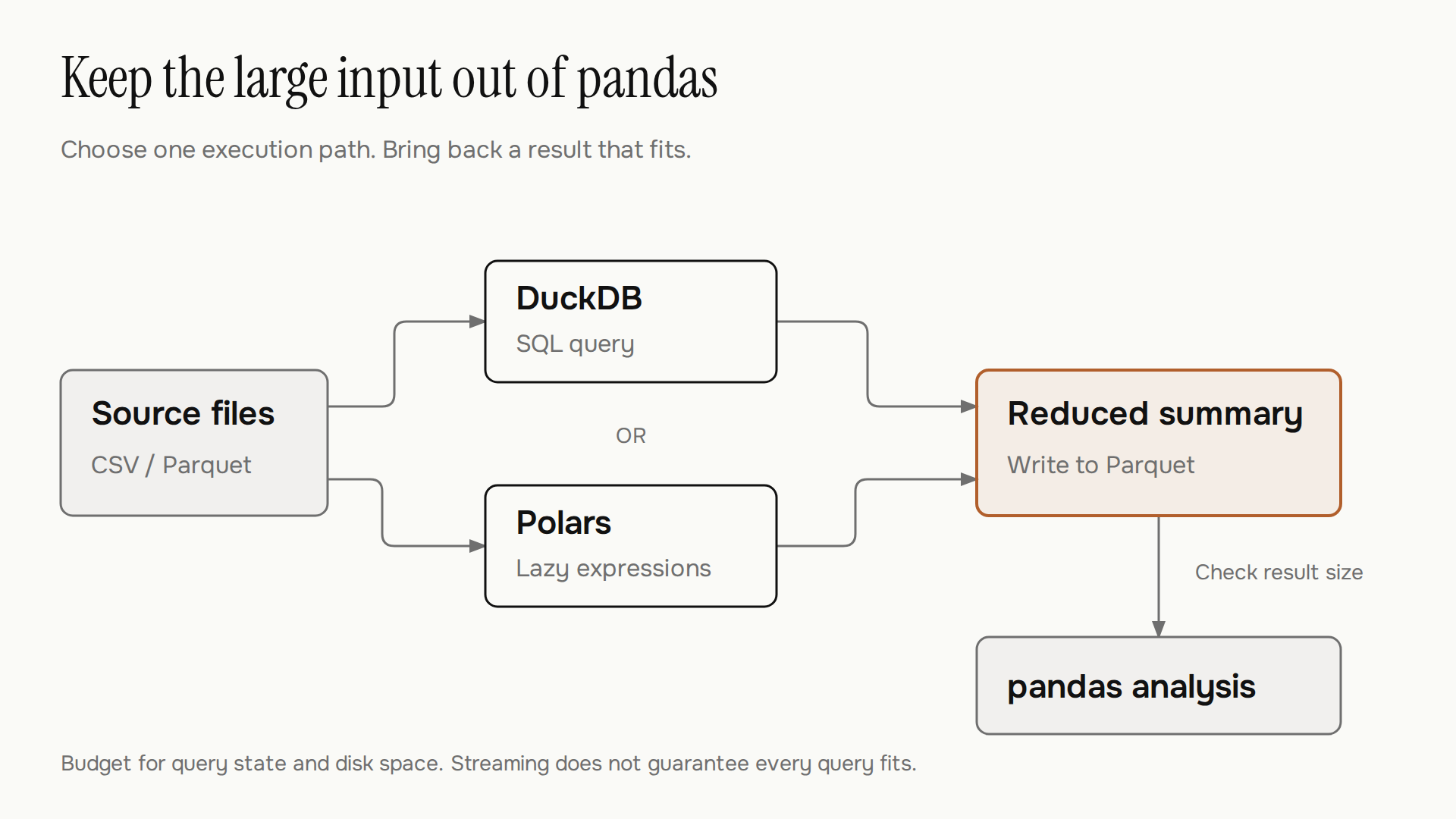
The diagram shows one workflow for keeping large inputs outside pandas. DuckDB and Polars are alternatives, not consecutive stages. Saving the summary to Parquet is optional; the important boundary is that the result fits before you bring it into pandas.
The format and the engine solve different parts of the problem; choose each based on the work you need to do.
When pandas is still the right choice
Keep pandas when the working set and peak allocations fit comfortably within your process budget, the code is reliable, and its ecosystem fits the next step. A rewrite has a cost even when the replacement tool is capable.
Use the bottleneck, not a file-size cutoff, to choose a first experiment:
Situation | First approach to test | Check before adopting it |
|---|---|---|
You only need a few columns | pandas | Whether later operations still exceed memory |
The task combines independent batches | pandas chunked processing | Whether accumulated state stays manageable |
The failing step is SQL-shaped | DuckDB over the source files | Join cardinality, temporary disk, and result size |
The pipeline uses DataFrame transformations | Polars lazy scans and a file sink | Semantic differences and streaming support |
Several jobs repeatedly parse the same CSV | Convert to Parquet | Types, selected columns, and file layout |
Before replacing production code, compare outputs on a representative sample. Check null handling, duplicate keys, row counts, and aggregation results. Do not depend on row order unless you explicitly sort. For floating-point totals, choose an appropriate comparison tolerance rather than expecting every execution strategy to produce bit-for-bit identical results.
Then test a representative workload under the memory and disk limits it will actually have. A small sample can validate logic, but it cannot establish that the full job will fit.
Move the bottleneck, keep what works
A pandas out of memory failure does not require abandoning pandas. It requires a clearer boundary between the data you process and the result you keep in RAM.
Start with the failing operation. If selecting columns or chunking fixes it, keep that smaller change. If it needs larger intermediate state, test DuckDB or Polars with the real query and resource limits. When repeated CSV parsing is part of the cost, evaluate Parquet separately.
Keep pandas for the final analysis if that result fits. The useful outcome is a job that produces the right answer within its budget, with enough headroom for the next input file.