PDF table extraction for RAG: 5 practical checks
Cover Image

A financial report puts revenue beside three year headings. Extraction keeps the numbers but loses their column labels. Retrieval finds the right page, yet the assistant answers with the wrong year's figure. You can improve the prompt and still leave the original error untouched.
PDF table extraction for RAG needs to preserve the relationships between cells, headings, units, and surrounding text. Character recognition alone does not provide those relationships. Before tuning retrieval, compare the extracted table with the source and check whether a reader could still identify each value correctly.
This guide covers parser selection, conditional OCR, table representations, and a small evaluation plan. It is a design guide, not a benchmark: no sample PDFs or parser runs were used to produce comparative scores. The useful question is which approach preserves the facts in your document mix, at a processing cost you can accept.
Begin with the failures you can see in the extracted output.
1. Diagnose what PDF table extraction for RAG lost
A PDF page describes a rendered layout. The logical table you see is not necessarily stored as a ready-to-use matrix. Text extraction and table reconstruction can fail separately.
Symptom | What to inspect |
|---|---|
Numbers appear without labels | Row names, column headings, and reading order |
A merged heading applies to the wrong columns | Header spans and the hierarchy beneath them |
Body paragraphs interrupt table rows | Table boundaries and neighboring page columns |
A table continuation becomes a new unrelated table | Repeated headings, page breaks, and continuation labels |
Values look plausible but differ from the source | Decimal marks, minus signs, digits, and footnote markers |
Check units too. A correct value under a lost "USD millions" heading is still easy to misinterpret. Preserve the caption, reporting period, and footnotes that change the meaning of a row. Distinguish a blank cell from zero, a dash used for missing data, and a value inherited from a merged header.
Think of a table as a spreadsheet whose column names have been removed. Every number can remain intact while the sheet becomes unsafe to use. A parser success flag tells you the operation completed, not that those relationships survived.
Create a small set of representative documents: ordinary tables, merged headers, multiple page columns, scanned pages, and tables continued across pages. One example can expose a failure, but it cannot establish reliability for the whole class. Add more examples as you discover variation.
Once you know what breaks, compare the extraction approaches on those same examples.
2. Compare parser capabilities without inventing a winner
A useful comparison records supported features and your observed results separately. Documentation establishes that an option exists. Your test set establishes whether it works on your PDFs.
PyMuPDF4LLM's RAG documentation describes producing Markdown from PDF content, including tables. It is a candidate when you want an extraction output that can stay close to a document-oriented retrieval pipeline. Inspect the exported headers, table boundaries, and reading order rather than accepting well-formed Markdown as evidence of correctness.
Docling's official repository lists PDF layout analysis, table structure recognition, OCR support, and exports including Markdown and structured document data. That makes it a candidate when you need more than a plain text stream. Structured output is especially useful for retaining table identity and inspecting reconstructed cells, but it still needs comparison with the source.
Unstructured's partitioning documentation describes PDF processing strategies such as fast, hi_res, and ocr_only. Table extraction depends on the strategy and table-structure options you enable. Check the documentation for your installed version and inspect its table elements rather than assuming every mode produces the same representation.
Run the candidates with recorded versions and settings. Compare cell values, header associations, page coverage, processing time, and memory use. Include installation requirements, model downloads, licenses, and whether your chosen configuration sends content to an external service. A tool supporting local operation does not establish how every integration around it handles data.
Do not rank parsers by a few anecdotal timings. Hardware, page count, image resolution, model initialization, and the proportion of scanned pages all affect the result. Separate startup time from repeat processing if both matter to your workload.
The next decision is which pages need OCR before table structure can be recovered.
3. Use OCR where recognition is needed
OCR recognizes characters in images. Table structure recognition determines how those characters belong to rows, columns, and headers. A pipeline may combine them, but they are different jobs: recognizing every digit does not guarantee that the digit lands in the correct cell.
Inspect pages individually where your tooling permits it. A document can contain searchable prose alongside an image-only table. It can also have a defective or misaligned hidden text layer. The presence of some selectable text does not establish that every table has usable text.
A low extracted-character count is only a screening signal. A blank page, an illustration, and a scanned table can all produce little text while requiring different handling. Conversely, an image-only table may sit on a page with enough ordinary text to pass a character-count threshold. Combine extraction checks with page or region inspection rather than using a fixed count as an automatic OCR decision.
Keep the source image or page reference with the result. When recognition changes a decimal point or drops a minus sign, you need a way to inspect the original. Mark unreadable pages and failed OCR explicitly; do not silently treat missing output as an empty table.
Prefer using an existing usable text layer when it meets your quality criteria. If recognition is inadequate, evaluate OCR and structure recovery together. Measure whether that path fixes the actual failure instead of only increasing processing time.
Once the table is reconstructed, choose a representation that fits the questions it must answer.
4. Keep table meaning in chunks and structured records
There are several reasonable representations. All need a stable table identifier, a source document revision, and enough provenance to locate the original page or region.
Representation | Useful when | What must remain attached |
|---|---|---|
Markdown table | A small table fits the retrieval context | Caption, headers, units, and relevant notes |
Row-oriented records | Questions usually target individual rows | Row identity and complete column context |
Dataframe or SQL table | Questions need filters, totals, or comparisons | Explicit schema, types, units, and source lineage |
For Markdown, do not split a table at an arbitrary token boundary. If a table is too large, divide it into meaningful row groups and repeat the needed headings and units. Parent-child retrieval can return surrounding context after a smaller child record matches, but the parent still has to fit the available context budget. A single huge parent is not a solution to a huge table.
Merged headers need deliberate normalization. A heading such as "Revenue" spanning several year columns can become explicit field names or structured header metadata. Preserve the original span information too if it matters to auditing. Do not fill empty cells automatically without knowing whether they represent missing values, merged labels, or deliberate blanks.
A dataframe gives data a tabular shape; it does not prove the reconstructed grid is correct. You can put incorrectly aligned values into perfectly valid columns. Check the reconstruction before converting types or importing into SQL, and preserve the raw extracted cell text alongside normalized values where you need to investigate conversion errors.
SQL can perform exact aggregation over the stored records, but the answer still depends on correct extraction, query generation, and unit handling. If a model proposes queries, restrict execution to approved read-only access and bounded workloads. Verify generated queries against known-answer cases; a query that runs successfully can still answer the wrong question.
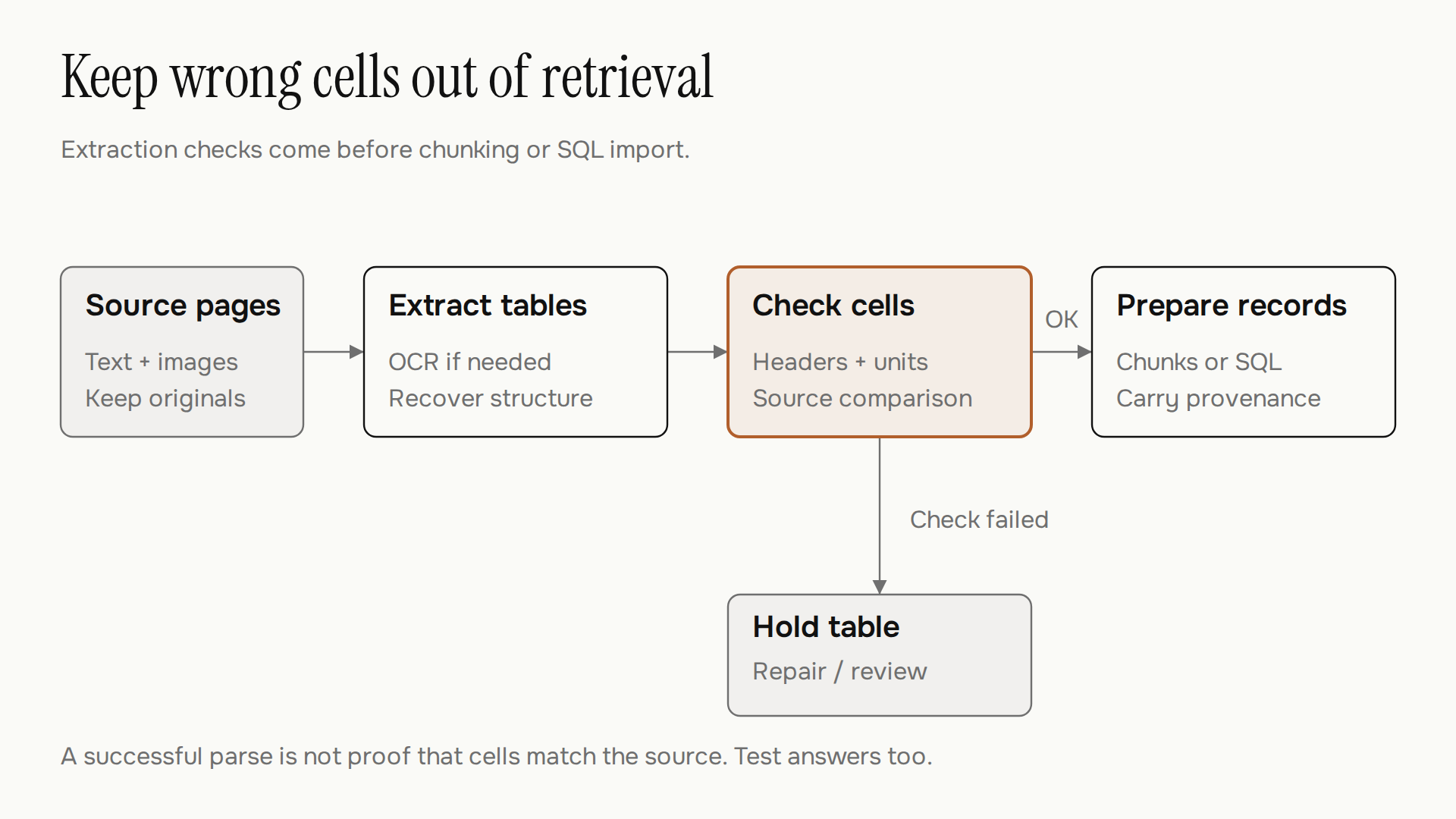
The diagram shows the quality checkpoint, not a guarantee that every defect is detectable. Apply automated checks where possible and direct source review to the cases your release policy requires. This gives you a boundary to test before considering a more expensive extraction path.
5. Evaluate fallbacks and answers on the same documents
When ordinary extraction fails, compare a different structure model, a vision-language model, targeted manual correction, or a structured source such as an original spreadsheet. None is a universal escape hatch. A vision model can also omit cells, misread numbers, or produce plausible values that are absent from the page.
If you evaluate a hosted service, check permission to send the documents, provider retention, and applicable data-handling requirements first. Local models avoid that particular transmission, but still have runtime and operational costs. Measure failed-document rates and review effort alongside processing time; cheap extraction can become expensive if every table needs repair.
Build an evaluation set with expected cell values and questions. Include cases where the correct answer is that a value is missing or unreadable. Keep some documents out of parser tuning so you can assess how well the chosen configuration handles unseen layouts.
Test question or event | What a passing result requires |
|---|---|
Which year's revenue is this? | Correct value, year heading, and reporting unit |
What does this blank cell mean? | No invented zero or copied neighboring value |
Does a table continue on the next page? | Correct continuation without duplicate header rows |
Can the requested total be computed? | Correct row selection, units, and arithmetic |
One page fails processing | Recorded failure and no silently incomplete release |
A parser version changes | Regression checks against the saved examples |
These are proposed acceptance checks, not results of tests run for this article. Set thresholds according to the consequences of a wrong answer. A financial reporting workflow may require different review controls from a low-stakes document search tool.
Evaluate the full path as well as extraction. Correct cells can still be lost during chunking or retrieval, and correct retrieved context does not guarantee a correct generated answer. Keep those failure counts separate so the next change addresses the right stage.
Start with a table you can trace
PDF table extraction for RAG becomes easier to debug when one answer can be traced back to its source cells. Keep the document revision, page, table identity, parser settings, and any normalization decisions with the derived records.
Begin with a small, varied document set and questions whose answers you can check directly. Inspect the extracted cells, the records the retriever receives, and the context passed into the model. Expand the set when a new layout exposes a failure.
You do not need to declare a winning parser for every PDF. You need a tested route for the documents you accept, a visible outcome for the ones you cannot read, and an original page you can return to when a number looks wrong.