AI-Powered Data Pipeline Automation: A Practical Guide for 2026
Cover Image
Your data pipeline breaks at 3am. Again. The cron job that was supposed to transform customer events crashed silently, and now your analytics dashboard is showing incorrect numbers for the last six hours. You've been meaning to automate the alerting, improve the error handling, and add retry logic — but there's always something more urgent.
Sound familiar? You're not alone. Managing data pipelines at scale is one of the most painful parts of any data team's job. The repetitive work of keeping pipelines healthy — monitoring, retrying failed jobs, handling schema changes, managing resource constraints — eats up time that could go toward actual product work.
AI-powered data pipeline automation promises to fix this. But what does that actually mean in practice in 2026, and where does the reality fall short of the hype? Let's dig in.
What AI-Powered Data Pipeline Automation Actually Means in 2026
At its core, AI-powered data pipeline automation means using machine learning to handle the operational decisions that traditionally required a human engineer: when to retry a failed job, how to prioritize competing workloads, what to do when data quality degrades, how to optimize pipeline performance based on historical patterns.
This isn't just "ETL with better scheduling." It's systems that observe their own behavior, learn from past failures, and adapt without human intervention. Think of it like a senior data engineer who never sleeps, never forgets to check the monitoring dashboard, and gets better at predicting problems over time.
In 2026, this has matured significantly. The latest generation of pipeline tools can detect anomalies in data distribution before they cause downstream failures, automatically scale compute resources based on workload patterns, and even suggest schema changes based on observed data evolution.
The Core Components: Ingestion, Transformation, Quality, and Monitoring
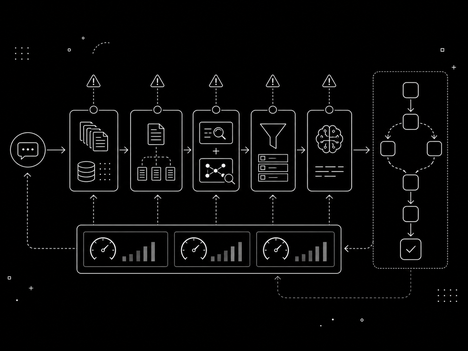
A well-designed AI-powered pipeline has four key stages, each with its own automation opportunities:
Ingestion — AI helps with automatic schema detection, format conversion, and backpressure handling. When a data source changes its output format, AI can detect the shift and adapt the ingestion logic without manual reconfiguration.
Transformation — This is where AI adds the most value. Automated data quality profiling, intelligent join ordering, and ML-based anomaly detection in transformation logic all reduce the manual work of keeping data clean and consistent.
Quality — AI-driven data observability tools can automatically set thresholds for data quality metrics, detect drift, and alert before issues propagate to dashboards or ML models.
Monitoring — Beyond standard metrics (throughput, latency, error rates), AI monitoring can correlate pipeline failures with upstream events, predict resource bottlenecks, and surface insights like "this pipeline has been getting 5% slower every week for the last month."
Where AI Adds Real Value (and Where It Doesn't)
Here's the honest picture.
Where AI genuinely helps:
- Anomaly detection in data quality — catching edge cases that rule-based systems miss
- Automated resource scaling — right-sizing compute based on workload patterns
- Root cause analysis — correlating pipeline failures with upstream events across hundreds of dependencies
- Smart alerting — reducing alert fatigue by learning which patterns actually indicate problems
- Schema evolution — automatically detecting and adapting to structural changes in source data
Where AI still struggles:
- Understanding business context — AI knows data is missing, but can't always know why it matters
- Debugging complex failures — AI can surface problems faster, but human judgment is still needed to fix them
- Data governance — automating PII detection is useful, but policy decisions require human oversight
- Novel failure modes — AI excels at patterns it's seen before; truly novel failures still require human intervention
The key insight: AI makes the operational parts of pipeline management dramatically better, but it doesn't replace the need for engineers who understand data semantics.
Building Your First AI-Enhanced Pipeline: A Practical Approach
You don't need to rip and replace your existing pipelines. Start small with a single pipeline that has enough failures to make automation worthwhile.
Here's a practical starting point:
Step 1 — Add observability first. Before you can automate anything, you need data. Instrument your pipeline with metrics on throughput, latency, error rates, and data quality (null counts, freshness, distribution stats). Tools like Grafana or Datadog are good starting points.
Step 2 — Choose one pain point to automate. Pick the failure mode that costs you the most time. Is it failed jobs that need manual retry? Schema changes that break downstream dependencies? Set up AI monitoring focused on that single problem first.
Step 3 — Implement smart alerting. Replace your "alert if error count > 0" rules with ML-based anomaly detection. This alone can cut alert noise by 80% while catching more real issues.
Step 4 — Add automated retry with backoff. This is the lowest-hanging fruit. AI-driven retry logic can learn which failures are transient (retry immediately) vs. structural (retry with delay, or escalate).
Step 5 — Close the loop. After a few weeks of automated handling, review what the AI handled well and what it missed. Use this to tune your rules and thresholds.
💡 Tip: Don't try to automate everything at once. The ROI on AI pipeline automation is highest for high-frequency, repetitive failures. If your pipeline fails once a month and the fix takes 10 minutes, manual handling is fine.
Common Pitfalls: Cost, Monitoring, and Data Quality
Even with AI in the loop, three problems consistently derail pipeline automation efforts:
Cost overruns — AI-driven auto-scaling sounds great until you get the cloud bill at the end of the month. AI is good at using resources efficiently, but it needs constraints. Set hard limits on compute spend, and define clear policies for when the system should scale up vs. queue work for off-peak processing.
Black box monitoring — When an AI system makes a decision you don't understand, it's tempting to just trust it. But if your anomaly detector starts ignoring a real failure because it learned to treat it as normal, you need to be able to diagnose why. Invest in explainability tools alongside your automation.
Data quality is still a people problem — AI can detect data quality issues faster than humans, but it can't fix the root cause. Garbage in, garbage out applies to AI pipelines just as much as to any other system. Data governance and source system ownership can't be fully automated.
The Tools Landscape: Managed vs. Custom — How to Choose
The market in 2026 has converged on a few broad categories:
Managed platforms (Snowflake Cortex AI, Databricks Lakehouse, Google Cloud Dataflow with AI): These handle infrastructure, scaling, and often include built-in ML for anomaly detection and optimization. Best for teams that want to move fast without managing infrastructure. The tradeoff: less flexibility, potential vendor lock-in.
Custom pipelines (Airflow, Prefect, Dagster + custom ML): These offer full control over pipeline logic and ML components. Best for teams with specific requirements or complex multi-cloud architectures. The tradeoff: more operational overhead, requires data engineering expertise.
Hybrid approach — Many mature teams use managed platforms for standard ETL workloads while building custom ML components for the AI-specific logic (anomaly detection, cost optimization). This gives the best of both worlds but requires more architectural planning.
For most teams starting fresh in 2026, a managed platform with built-in AI features is probably the right call. The AI tooling has matured enough that building custom ML for pipeline automation rarely pays back the engineering cost.
If you've been putting off automating your data pipelines because it felt like too big a project, 2026 is a good year to start. Pick one painful pipeline, add observability, implement smart alerting — and give your future self back those 3am debugging sessions.