Automated Data Collection Tools in 2026: What Actually Works
Cover Image
You set up a scraper. Runs fine for 45 minutes. Then: CAPTCHA. Then 403. Then your IP is blocked and the proxy pool you paid for isn't answering tickets.
Most content about automated data collection tools is written by people who ran their scraper exactly once. This is written from the other side of that wall.
What follows is the honest landscape of how automated data collection works in 2026 — what tools do, where they fail, and which friction points you need to solve before writing a single line of extraction logic.
What Automated Data Collection Actually Means in 2026
"Data collection" covers wider territory than most posts admit:
API-based collection is the cleanest form. Structured data over HTTP, rate limits set by the provider, no ambiguity. Most major platforms offer APIs (sometimes at a price). Start here whenever possible.
Web scraping is what most people mean — extracting data from pages that don't offer an API. This is where friction lives. Modern anti-bot systems (Cloudflare, PerimeterX, DataDome) are sophisticated enough that naive scraping fails more often than it succeeds in 2026.
RPA (Robotic Process Automation) handles workflows requiring real browser sessions: logging into portals, filling forms, navigating dashboards. Playwright's automation API handles most of this territory.
IoT and sensor pipelines collect from physical devices and stream to data warehouses. Less glamorous than scraping, more reliable — data comes to you.
Each has different tools, different failure modes, different cost profiles. First decision: which category your problem actually belongs to.
The Tool Landscape: What Developers Actually Use
Skip the "top 10 scraping tools" posts. They're incomplete and usually written before the author hit the actual friction.
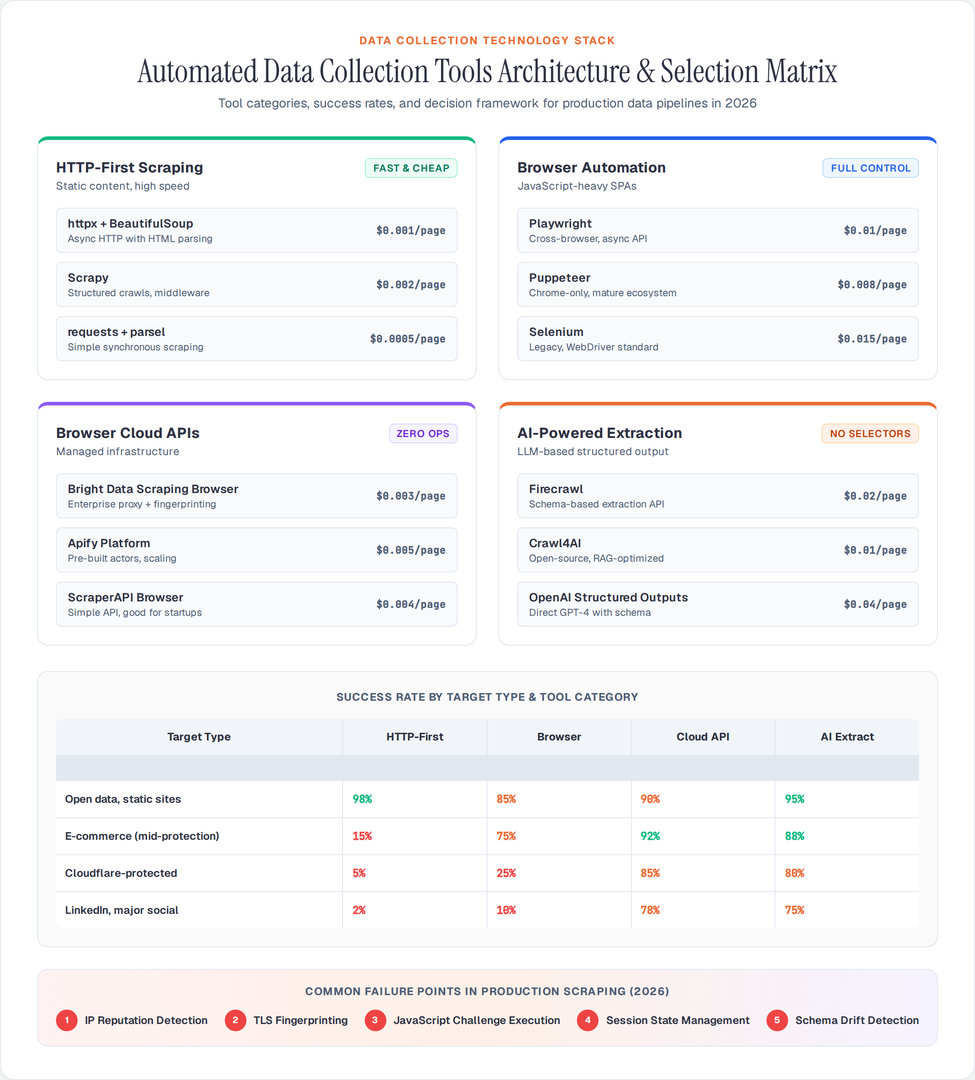
Here's the 2026 breakdown by category:
Category 1: HTTP-First Scraping
For sites without aggressive bot protection, HTTP clients are fastest and cheapest.
Python requests + httpx
Still the foundation for straightforward HTTP scraping. httpx replaced requests for most async work:
import httpx
import asyncio

async def fetch_pages(urls: list[str]) -> list[str]:
    async with httpx.AsyncClient(
        headers={"User-Agent": "Mozilla/5.0 (compatible)"},
        timeout=30.0,
        follow_redirects=True,
    ) as client:
        tasks = [client.get(url) for url in urls]
        responses = await asyncio.gather(*tasks, return_exceptions=True)
    return [r.text for r in responses if not isinstance(r, Exception)]
Handles most static pages at high speed. Add hishel for caching, tenacity for retry logic.
Scrapy
Still the correct choice for structured crawls with complex link-following logic. The middleware architecture handles proxies, rate limiting, and retry in one place:
class ProductSpider(scrapy.Spider):
    name = "products"
    custom_settings = {
        "CONCURRENT_REQUESTS": 16,
        "DOWNLOAD_DELAY": 0.5,
        "ROTATING_PROXY_LIST_PATH": "/etc/proxies.txt",
        "RETRY_HTTP_CODES": [500, 502, 503, 504, 408, 429],
    }

    def parse(self, response):
        for product in response.css(".product-card"):
            yield {
                "title": product.css("h3::text").get(),
                "price": product.css(".price::text").get(),
                "url": response.url,
            }
        yield from response.follow_all(css="a.next-page", callback=self.parse)
Scrapy Cloud (now Zyte) handles deployment if you don't want to manage infra.
Category 2: Browser Automation
For JavaScript-heavy SPAs, sites that render data client-side, or anything requiring real browser behavior.
Playwright (Python/Node.js)
The dominant choice in 2026. Microsoft maintains it, cross-browser support is solid, async API is clean:
from playwright.async_api import async_playwright

async def scrape_spa(url: str) -> dict:
    async with async_playwright() as p:
        browser = await p.chromium.launch(headless=True)
        context = await browser.new_context(
            user_agent="Mozilla/5.0 (Windows NT 10.0; Win64; x64) AppleWebKit/537.36",
            viewport={"width": 1920, "height": 1080},
        )
        page = await context.new_page()
        await page.goto(url, wait_until="networkidle")
        # Wait for dynamic content
        await page.wait_for_selector(".data-table", timeout=10000)
        data = await page.evaluate("""() => {
            return Array.from(document.querySelectorAll('.row')).map(row => ({
                name: row.querySelector('.name')?.textContent,
                value: row.querySelector('.value')?.textContent,
            }));
        }""")
        await browser.close()
        return data
Caution: Playwright detection is actively worked on. Sites using Cloudflare Turnstile or Akamai Bot Manager will flag headless Chromium even with proper user agents. For heavily protected targets, move to a browser cloud API.
Category 3: Browser Cloud APIs
When you need browser rendering at scale without managing infrastructure.
Bright Data's Scraping Browser
Manages fingerprinting and TLS characteristics automatically. Connects via standard Playwright API:
from playwright.async_api import async_playwright

async def scrape_with_bright_data(url: str):
    async with async_playwright() as p:
        browser = await p.chromium.connect_over_cdp(
            f"wss://brd-customer-{CUSTOMER_ID}-zone-scraping_browser1:PASSWORD@brd.superproxy.io:9222"
        )
        page = await browser.new_page()
        await page.goto(url, wait_until="domcontentloaded")
        html = await page.content()
        await browser.close()
        return html
Monthly costs matter here. Bright Data is priced for enterprise volume — around $500/month minimum for meaningful usage. Not appropriate for small projects.
Apify Platform
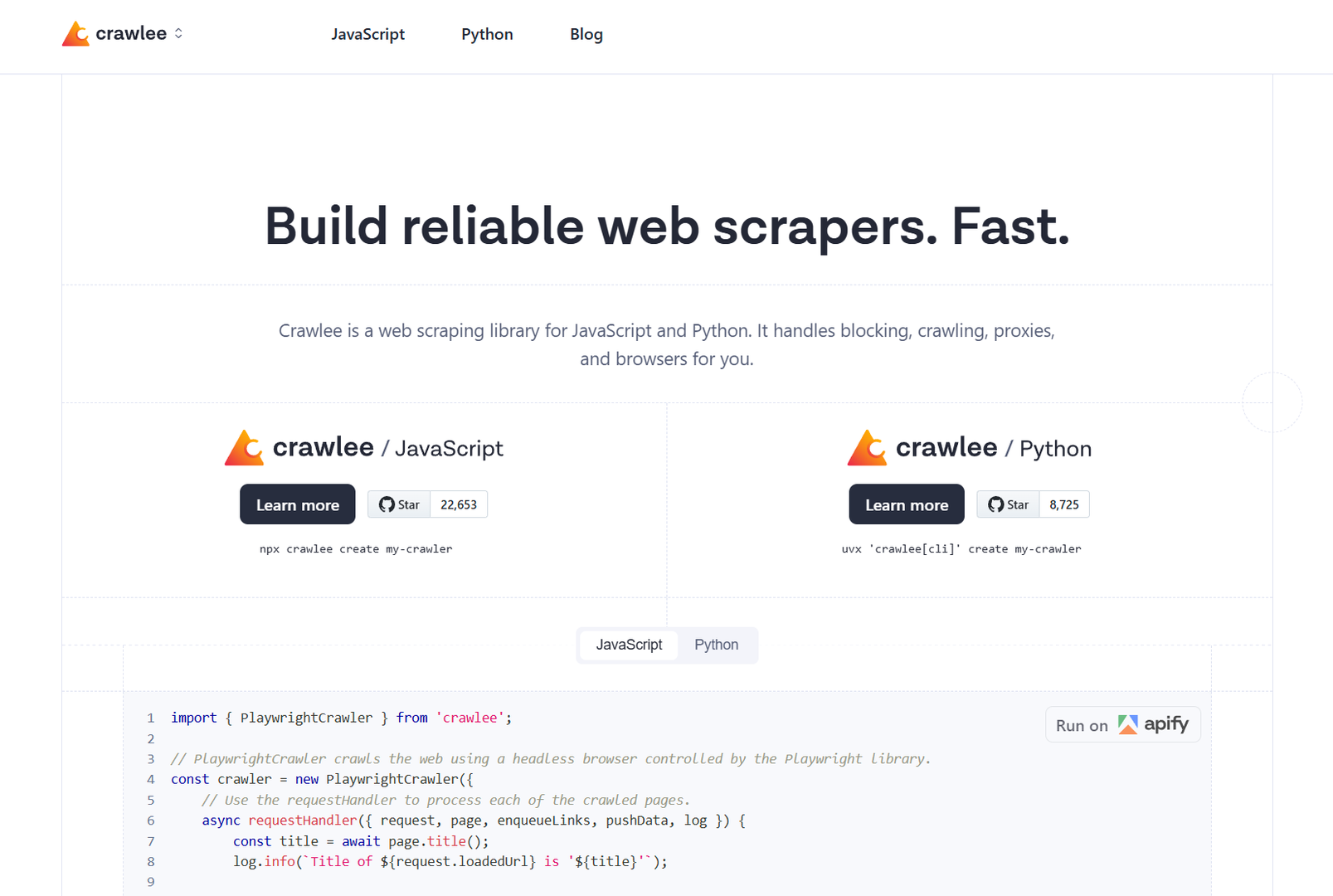
Strong choice for teams wanting managed actors (encapsulated scraping tasks) without building infrastructure. Pre-built actors for major sites, scaling built-in, storage handled. Free tier for exploration:
const { Actor } = require('apify');
const { PuppeteerCrawler } = require('crawlee');

Actor.main(async () => {
    const crawler = new PuppeteerCrawler({
        async requestHandler({ page, request }) {
            const title = await page.title();
            await Actor.pushData({ url: request.url, title });
        },
    });
    await crawler.run(['https://example.com']);
});
Category 4: AI-Powered Extraction
The genuine 2026 shift: LLM-based parsers that extract structured data without manual selectors.
Firecrawl
Open-source tool that converts any URL to clean markdown or structured JSON. Uses LLMs to identify and extract data fields. Removes the XPath/CSS selector maintenance problem:
from firecrawl import FirecrawlApp

app = FirecrawlApp(api_key="fc-...")

# Extract structured data with schema
result = app.scrape_url("https://example.com/product", {
    "formats": ["extract"],
    "extract": {
        "schema": {
            "type": "object",
            "properties": {
                "product_name": {"type": "string"},
                "price": {"type": "number"},
                "availability": {"type": "boolean"},
                "specifications": {
                    "type": "array",
                    "items": {"type": "string"}
                }
            }
        }
    }
})
Selector maintenance cost drops to near zero. Tradeoff: per-page LLM calls cost more than pure HTML parsing.
Crawl4AI
Open-source alternative focused on LLM-ready output. Converts web content to clean markdown optimized for AI pipelines. Good for RAG systems that need web data:
import asyncio
from crawl4ai import AsyncWebCrawler, CrawlerRunConfig

async def crawl():
    config = CrawlerRunConfig(
        word_count_threshold=10,
        remove_overlay_elements=True,
        process_iframes=True,
    )
    async with AsyncWebCrawler() as crawler:
        result = await crawler.arun(
            url="https://docs.example.com",
            config=config,
        )
        print(result.markdown)  # Clean markdown ready for LLM

asyncio.run(crawl())
The Proxy Problem: What No One Explains
Every scraping tutorial shows you how to rotate proxies. None explain why naive rotation fails.
The anti-bot detection surface in 2026:
- IP reputation (residential vs datacenter, flagged ranges)
- TLS fingerprint (cipher suites, extension order — Chromium has a distinct fingerprint)
- HTTP/2 header order (browsers send headers in specific order; raw clients don't)
- JavaScript challenge execution (fingerprinting through canvas, WebGL, font rendering)
- Behavioral patterns (request timing, mouse movement, scroll depth)
Rotating datacenter IPs handles point 1 only. Modern systems check 2 through 5 simultaneously. This is why residential proxies have a success rate 3-4x higher than datacenter IPs for protected targets.
Proxy tier selection in 2026:
| Target Type | Proxy Type | Expected Success Rate |
|---|---|---|
| Open data, static sites | Datacenter | 95%+ |
| E-commerce (mid-protection) | Residential rotating | 85-92% |
| Financial, travel, major retail | Residential ISP | 90-95% |
| LinkedIn, Cloudflare-protected | Browser cloud API | 85%+ |
Budget guide: datacenter proxies run $0.5-2/GB. Residential $3-10/GB. Browser cloud APIs $0.002-0.005 per page render. For 100K pages/month, residential proxies cost $150-400; browser cloud costs $200-500.
Data Storage Patterns That Actually Scale
Getting the data is only half the problem. Most pipelines break at storage.
Don't start with a database. Start with files. Parquet files for tabular data, JSON Lines for unstructured. Both handle millions of rows, compress well, and load fast with pandas/polars:
import polars as pl

# Append new data to existing file
df_new = pl.DataFrame(scraped_data)
existing = pl.scan_parquet("data/products.parquet")
combined = pl.concat([existing.collect(), df_new])
combined.write_parquet("data/products.parquet", compression="zstd")
Add a database when you need queries. DuckDB runs SQL directly on Parquet files without a server. SQLite for small persistent stores. PostgreSQL when you have multiple writers or need full-text search:
import duckdb

# Query Parquet without loading into memory
conn = duckdb.connect()
result = conn.execute("""
    SELECT category, COUNT(*) as count, AVG(price) as avg_price
    FROM read_parquet('data/products.parquet')
    WHERE scraped_at > '2026-01-01'
    GROUP BY category
    ORDER BY count DESC
""").df()
Orchestration: Keeping Pipelines Running
Ad-hoc scraper scripts fail silently, miss error states, and have no visibility. Production data collection needs orchestration.
Airflow remains the standard for complex pipelines with dependencies. Heavy for simple cases.
Prefect better developer experience for Python-native teams:
from prefect import flow, task
from prefect.schedules import CronSchedule

@task(retries=3, retry_delay_seconds=60)
def scrape_category(category_url: str) -> list[dict]:
    return run_scraper(category_url)

@task
def save_results(data: list[dict], category: str):
    df = pd.DataFrame(data)
    df.to_parquet(f"data/{category}.parquet")

@flow(schedule=CronSchedule(cron="0 6 * * *"))
def daily_product_scrape():
    categories = get_category_urls()
    for category_url, name in categories:
        data = scrape_category(category_url)
        save_results(data, name)
For simple scheduled scraping, a Kubernetes CronJob or GitHub Actions workflow is enough. Don't over-engineer.
What Breaks in Practice
Patterns that look correct but fail at scale:
Session state not maintained. Shopping carts, logged-in views, personalized prices all require session cookies persisted between requests. httpx's Client handles this; raw requests.get() doesn't.
JavaScript-rendered prices. A product page may return static HTML with no price — the price loads via a second XHR after page render. Check the Network tab before writing your parser. The XHR endpoint is often cheaper to call directly.
Silently changed schemas. A site redesign changes a CSS class from .price to .product-price. Your scraper runs, returns nulls, no error raised. Add validation on extracted data: if expected fields are missing, alert rather than store empty rows.
Timezone and locale-specific data. Prices, availability, search results can differ by geographic IP location. If you need consistent data, pin your proxy geolocation.
The Practical Decision Tree
Concrete starting point for selecting a tool stack:
- Does the site have an official API? Use it. This is always faster than scraping.
- Is the site mostly static HTML?
httpx+BeautifulSouporhttpx+parsel(Scrapy's parser, usable standalone). - Does the site render data with JavaScript? Playwright locally, Bright Data Scraping Browser or ScraperAPI for scale.
- Is the site behind Cloudflare or PerimeterX? You need a browser cloud API. Bright Data, Oxylabs, or Smartproxy with their headless options.
- Do you need LLM-ready clean output? Firecrawl or Crawl4AI.
- Do you need pre-built actors for major sites? Apify.
The stack that handles 90% of real projects: httpx for static content, Playwright for SPAs, a residential proxy for protected targets, Parquet for storage, DuckDB for analysis. Total cost for 100K pages/month: under $200.
Conclusion
Automated data collection in 2026 works well when you match the tool to the problem. HTTP clients for static content, browser automation for SPAs, browser cloud APIs for bot-protected targets, and LLM-powered extraction when you need structured output without selector maintenance.
The failure mode is almost always using the wrong category of tool for the target — running headless Chromium against open data (wasteful), or using bare requests against Cloudflare-protected sites (blocked immediately).
Know what you're scraping before picking the stack. The tool selection follows from the target's architecture, not from which library has the most GitHub stars.
Author

Author