Data Input and Output with Pandas in 2026: The Complete Guide (CSV, Parquet, SQL, Arrow & Cloud)
Data ingestion and export often consume more compute time and memory than the actual transformation logic. In modern data engineering, choosing the wrong serialization format or using naive read_csv() defaults can exhaust server RAM and introduce massive latency.
With the integration of Apache Arrow in Pandas 2.x and direct cloud filesystem support, data I/O in Python has fundamentally transformed. This guide covers how to read and write data with maximum speed, minimal RAM usage, and zero data corruption across CSV, Parquet, Feather, SQL, JSON, and Cloud Object Storage.
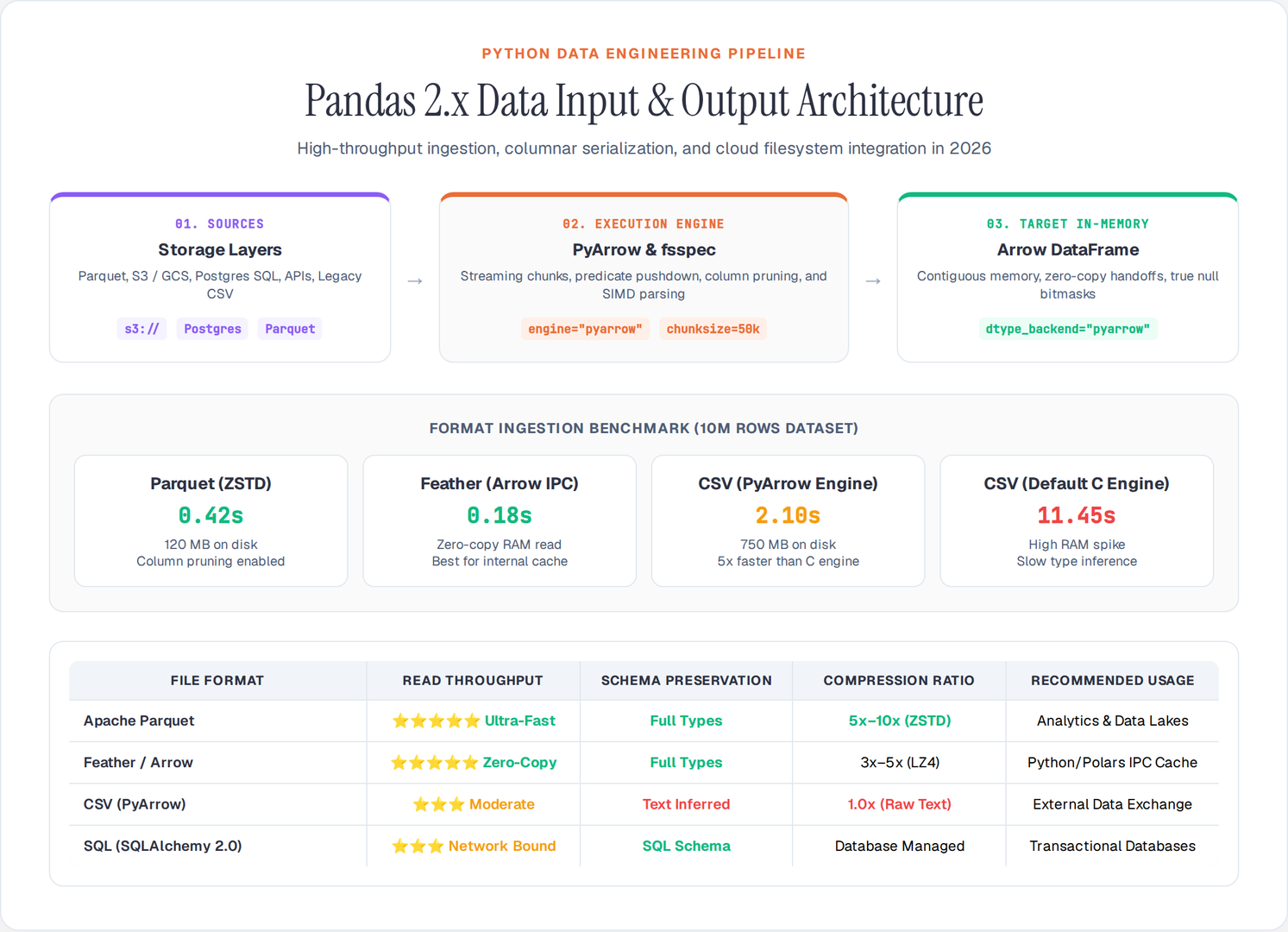
1. High-Performance Columnar Storage: Parquet & Feather
For any dataset exceeding a few megabytes, Apache Parquet should be your default storage format. Unlike row-based CSVs, Parquet stores data column-by-column with dictionary encoding and snappy/zstd compression.
Why Parquet Outperforms CSV:
- Column Pruning: Read only the specific columns you need without parsing the entire file.
- Strict Schema Preservation: Data types (timestamps, categoricals, floats) remain intact with zero type inference overhead.
- 5x–10x Smaller File Size: High compression ratios save disk space and network bandwidth.
import pandas as pd

# Writing to Parquet with modern compression
df.to_parquet(
    "analytics_data.parquet",
    engine="pyarrow",
    compression="zstd",
    index=False
)

# Column pruning: Loading only requested columns
selected_df = pd.read_parquet(
    "analytics_data.parquet",
    columns=["user_id", "transaction_amount", "created_at"],
    engine="pyarrow"
)

# Predicate pushdown / filtering before loading into memory
filtered_df = pd.read_parquet(
    "analytics_data.parquet",
    filters=[("transaction_amount", ">", 100.0)],
    engine="pyarrow"
)
Ultra-Fast In-Memory Sharing: Feather / Arrow IPC
When exchanging DataFrames between Python processes, Polars, DuckDB, or R without serialization overhead, use Feather (Apache Arrow IPC format):
# Write Feather (zero-copy read format)
df.to_feather("cache_data.feather", compression="lz4")

# Read Feather
df_cached = pd.read_feather("cache_data.feather")
2. Optimized CSV Ingestion: PyArrow Engine & Chunking
When CSV files are unavoidable, using default pd.read_csv() settings can be painfully slow and memory-intensive.
Turbocharging CSV with the PyArrow Engine
Pandas allows you to switch the CSV parsing engine from C to PyArrow, delivering a 5x–10x speedup and native Arrow string handling:
import pandas as pd

# 5x-10x faster CSV ingestion with PyArrow backend
df_csv = pd.read_csv(
    "large_dataset.csv",
    engine="pyarrow",
    dtype_backend="pyarrow"  # Uses Arrow types (efficient RAM, proper nulls)
)
Handling Gigabyte-Scale CSVs with Chunking
When a CSV exceeds available system memory, process it in streaming chunks rather than loading it all at once:
def process_large_csv(file_path: str, chunk_size: int = 50_000) -> float:
    total_revenue = 0.0

    # Process 50,000 rows at a time
    for chunk in pd.read_csv(file_path, chunksize=chunk_size, usecols=["revenue", "status"]):
        valid_records = chunk[chunk["status"] == "COMPLETED"]
        total_revenue += valid_records["revenue"].sum()

    return total_revenue

print(f"Total Revenue: ${process_large_csv('sales_transactions_2026.csv'):,.2f}")
3. High-Throughput SQL Databases & Data Warehouses
Reading from and writing to relational databases requires SQLAlchemy 2.0 connection pooling and optimized batch execution.
from sqlalchemy import create_engine
import pandas as pd

# SQLAlchemy 2.0 Engine
engine = create_engine(
    "postgresql+psycopg2://user:password@db-host:5432/analytics_db",
    pool_size=10,
    max_overflow=20
)

# 1. Parameterized SQL Read (avoids SQL injection)
query = """
    SELECT user_id, email, signup_date, lifetime_value
    FROM users
    WHERE signup_date >= %(start_date)s
"""
df_users = pd.read_sql_query(
    sql=query,
    con=engine,
    params={"start_date": "2026-01-01"},
    parse_dates=["signup_date"],
    dtype_backend="pyarrow"
)

# 2. High-Speed Batch Insertion (chunked multi-insert)
df_users.to_sql(
    name="users_backup_2026",
    con=engine,
    if_exists="append",
    index=False,
    chunksize=5000,
    method="multi"  # Bundles rows into multi-value INSERT statements
)
4. Working with Nested JSON & Web APIs
Modern REST and GraphQL APIs return complex, hierarchical JSON. Pandas provides json_normalize to flatten nested payloads into clean tabular columns:
import pandas as pd

# Raw nested API response
api_payload = [
    {
        "id": "ord_101",
        "customer": {"name": "Alice Chen", "country": "US"},
        "items": [
            {"sku": "SKU_A", "qty": 2, "price": 25.0},
            {"sku": "SKU_B", "qty": 1, "price": 50.0}
        ]
    },
    {
        "id": "ord_102",
        "customer": {"name": "Marcus Vance", "country": "UK"},
        "items": [
            {"sku": "SKU_C", "qty": 4, "price": 12.5}
        ]
    }
]

# Flatten nested JSON into normalized relational DataFrame
df_orders = pd.json_normalize(
    data=api_payload,
    record_path="items",
    meta=["id", ["customer", "name"], ["customer", "country"]],
    record_prefix="item_"
)

print(df_orders)
5. Direct Cloud Storage I/O (S3, GCS, Azure Blob)
Pandas integrates natively with fsspec, s3fs, gcsfs, and adlfs to stream files directly from cloud object stores without downloading them to local disk first:
import pandas as pd

# Read directly from AWS S3
df_s3 = pd.read_parquet(
    "s3://my-enterprise-data-lake/processed/2026/events.parquet",
    storage_options={
        "key": "AWS_ACCESS_KEY_ID",
        "secret": "AWS_SECRET_ACCESS_KEY"
    }
)

# Read directly from Google Cloud Storage
df_gcs = pd.read_csv(
    "gs://ml-datasets-prod/features_2026.csv.gz",
    compression="gzip"
)

# Write directly to Azure Blob Storage
df_s3.to_parquet("az://analytics-container/output/report.parquet")
6. Format Performance Benchmark Matrix
Choosing the right format for your data pipeline has a direct impact on system resources:
| Format | Read Speed | Write Speed | File Size | Schema & Types | Best Use Case |
|---|---|---|---|---|---|
| Parquet | ⭐⭐⭐⭐⭐ (Instant) | ⭐⭐⭐⭐ (Fast) | 📦 Minimal (ZSTD/Snappy) | ✅ Full Schema | Data lakes, analytics, production ML pipelines |
| Feather (Arrow) | ⭐⭐⭐⭐⭐ (Zero-Copy) | ⭐⭐⭐⭐⭐ (Ultra-Fast) | 📦 Compact | ✅ Full Schema | Inter-process cache, Python/Polars handoffs |
| CSV (PyArrow) | ⭐⭐⭐ (Moderate) | ⭐⭐ (Slow text encode) | 📦📦 Large | ❌ Inferred text | External sharing, legacy tool exports |
| SQL (Batch) | ⭐⭐⭐ (Network bound) | ⭐⭐ (Transaction bound) | 📦 Server DB | ✅ SQL Types | Transactional records, centralized DBs |
| JSON Lines | ⭐⭐ (Parsing overhead) | ⭐⭐⭐ (Text stream) | 📦📦 Large | ⚠️ Semi-structured | Log aggregation, event streams |
Production Best Practices for Pandas I/O
- Migrate from CSV to Parquet across internal data pipelines to reduce compute costs and eliminate type casting bugs.
- Always use
engine="pyarrow"anddtype_backend="pyarrow"when reading CSVs to avoid Python object memory bloat. - Use
chunksizestreaming when files exceed 30% of system RAM. - Leverage
method="multi"or staging tables when inserting data into SQL databases.
By tailoring your input and output strategies to the characteristics of your dataset, you ensure fast, resilient, and scalable Python data workflows.
Author

Author
