Top Data Scraping Extensions for Chrome in 2026
Cover Image
Browser extensions solve a specific scraping problem: you need data from sites that require active login sessions, handle cookies dynamically, or serve content behind interstitial flows. Extensions run inside your authenticated browser session, which means they see everything you see — no separate auth, no session replication.
The tradeoff is scale. Extensions work for dozens to hundreds of pages. For millions, you need a proper scraping pipeline. This guide covers the extensions worth knowing in 2026, when to use them, and when to move on.
Who Actually Needs a Scraping Extension
Extensions make sense when:
- You need to scrape a site where you're already logged in (LinkedIn, internal portals, membership sites)
- You need data once or occasionally — not on a recurring automated schedule
- Non-technical users need to extract data without writing code
- You're prototyping a data extraction approach before building a full pipeline
They don't make sense for:
- High-volume extraction (>1,000 pages/day)
- Automated scheduled scraping
- Server-side pipelines (extensions only run in a browser)
- Sites that need geographic proxy routing
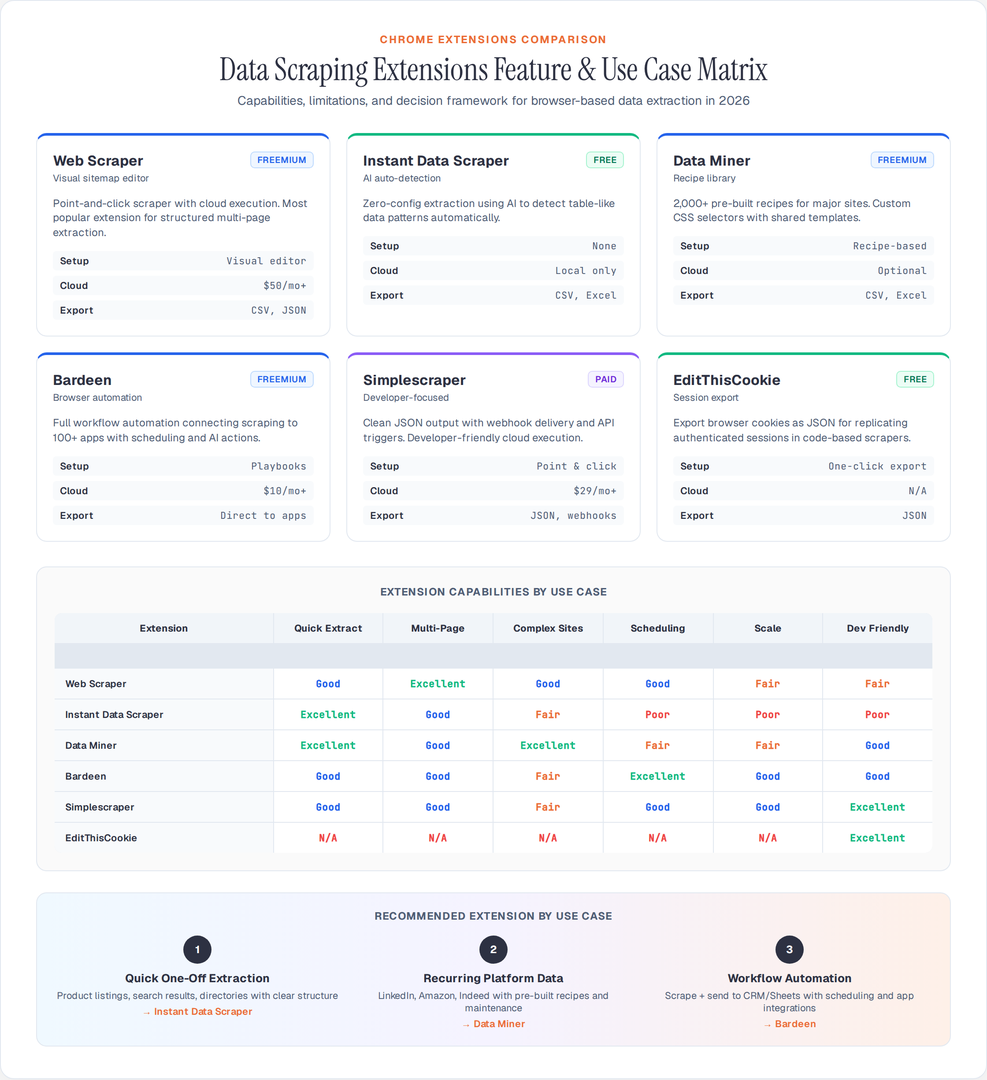
Web Scraper (webscraper.io)
The most widely used scraping extension on the Chrome Web Store. Works through a visual sitemap editor — you define which elements to click, what data to extract, and how to follow pagination.
What it actually does well:
- Point-and-click selector building without writing CSS/XPath
- Handles pagination, infinite scroll, and multi-page navigation flows
- Cloud version runs scrapes on their servers so you don't tie up your browser
Limitations in 2026:
- Cloud tier required for anything beyond basic extraction
- Selector maintenance breaks when sites redesign — same problem as code-based scrapers
- Export is CSV-only on the free tier; JSON requires paid plan
Pricing: Free for local scraping; Cloud from $50/month for 5,000 pages/month
Best for: Non-technical users building recurring data pulls from structured sites.
Instant Data Scraper
Browser extension that uses AI heuristics to auto-detect table-like data on a page and extract it without any configuration. Load the page, click the extension, and it presents the detected data in a preview before you export.
What it actually does well:
- Zero configuration — works on most product listing pages, search results, directories immediately
- Handles paginated results automatically by detecting and clicking next-page links
- Exports to Excel and CSV
- Completely free
Limitations:
- Detection accuracy varies. Complex layouts, nested grids, and non-standard DOM structures produce garbage output
- No custom selectors — what the AI detects is what you get
- No cloud execution; must stay open in browser
Best for: Quick one-off extractions from well-structured pages — Google Maps listings, e-commerce search results, LinkedIn company searches.
Data Miner
More powerful than Instant Data Scraper with full custom recipe support. Recipes define exactly which elements to extract using CSS selectors, and can be shared in a public library of 2,000+ pre-built recipes for popular sites.
What it actually does well:
- Shared recipe library covers most popular sites (Amazon, LinkedIn, Indeed, Zillow)
- Custom recipes with full CSS selector control
- Handles multi-page scraping with configurable delays
- More reliable on complex sites than AI-detection tools
Limitations:
- Free tier limits to 500 rows/month
- Recipe-based approach still requires maintenance when sites change structure
- No API or programmatic access
Pricing: Free (500 rows/month); Pro from $20/month for 10,000 rows
Best for: Teams that need pre-built extraction for major platforms without writing code.
Bardeen
Goes beyond scraping into full browser automation. Can extract data, fill forms, trigger actions, and connect outputs directly to Google Sheets, Airtable, Slack, or CRMs through built-in integrations.
What it actually does well:
- Connects scraping output directly to 100+ apps without export/import
- Automates multi-step browser workflows, not just extraction
- AI "magic actions" that attempt to infer what to do from natural language
- Can schedule automations to run at specific times
Limitations:
- More complex to set up than pure extraction tools
- Free tier is limited; meaningful use requires paid plan
- Automation playbooks break when target sites update
Pricing: Free (limited); Pro from $10/month
Best for: Workflows that combine data extraction with downstream delivery — scrape LinkedIn, send to Salesforce, no manual steps.
Simplescraper
Focused on clean output and ease of use. Point-and-click element selection, JSON output, and a cloud runner that executes scrapes without keeping your browser open.
What it actually does well:
- Cleaner JSON output than most competitors
- Cloud execution for async scraping
- Simple webhook delivery of scraped data
- API for triggering scrapes programmatically
Limitations:
- More limited than enterprise tools for complex multi-step flows
- Cloud tier costs add up quickly at scale
Pricing: Free (10 cloud pages/month); from $29/month for 2,500 pages
Best for: Developers who want a quick cloud-based extraction API for simple use cases.
EditThisCookie + Manual Session Export
Not a scraping tool per se, but relevant for pipelines that need to replicate your authenticated browser session in a code-based scraper. EditThisCookie exports all cookies from a tab as JSON, which you can then load into requests, httpx, or Playwright to continue scraping in a proper pipeline.
import httpx
import json

# Load cookies exported via EditThisCookie
with open('cookies.json') as f:
    raw_cookies = json.load(f)

cookies = {c['name']: c['value'] for c in raw_cookies}

async with httpx.AsyncClient(cookies=cookies) as client:
    response = await client.get('https://members.example.com/dashboard')
    # Now scraping an authenticated page
Best for: Developers who need to replicate browser sessions in code-based scrapers.
XPath Helper and CSS Selector Gadget
Utility extensions, not scrapers. XPath Helper lets you build and test XPath expressions against live pages. CSS Selector Gadget visually selects elements and displays the minimal CSS selector.
Both are invaluable when writing Playwright or Cheerio-based scrapers. Finding the right selector against a real page is faster than guessing from view-source.
Best for: Developers building code-based scrapers who need help with selector discovery.
When Extensions Hit Their Limits
Real-world limitations that come up fast:
JavaScript-heavy infinite scrolls. Extensions that auto-paginate look for a "next" button or URL change. Pure scroll-based lazy loading often fails or misses items.
Rate limiting and session detection. Rapid extension-based scraping from a single IP and session can trigger bans, same as code-based scrapers. Extensions don't rotate IPs.
Anti-bot during session. Some sites (LinkedIn especially) actively monitor session behavior and will flag or suspend accounts showing scraping patterns even from real browsers.
No scheduling without cloud tiers. Most free extensions require you to start the scrape manually. Recurring scheduled pulls require their cloud products.
The Practical Decision
For quick one-off data pulls from accessible sites: Instant Data Scraper (zero config, free).
For recurring pulls from major platforms with shared recipes: Data Miner (recipe library, reliable selectors).
For workflow automation connecting to CRMs and productivity tools: Bardeen.
For structured multi-page extraction with cloud execution: Web Scraper or Simplescraper.
For developer use — session export and selector discovery: EditThisCookie + XPath Helper.
When your volume exceeds a few hundred pages or you need scheduling, reliability, and proxy support, extensions are the wrong tool. Switch to a proper pipeline: httpx + Cheerio for static content, Playwright for dynamic, and a proxy API for bot-protected targets. Extensions are a useful starting point, not a production solution.
Author

Author