Playwright vs Puppeteer: Which Should You Choose in 2026?
Cover Image
Introduction
Playwright and Puppeteer are both solid browser automation libraries, but they've diverged significantly since Puppeteer first launched in 2017. By 2026, the gap has widened: Playwright has matured into a full test automation platform while Puppeteer remains a focused, lower-level browser control library.
This guide cuts through the noise with a direct comparison across the dimensions that actually matter: language support, browser coverage, reliability, performance, and ecosystem integration.
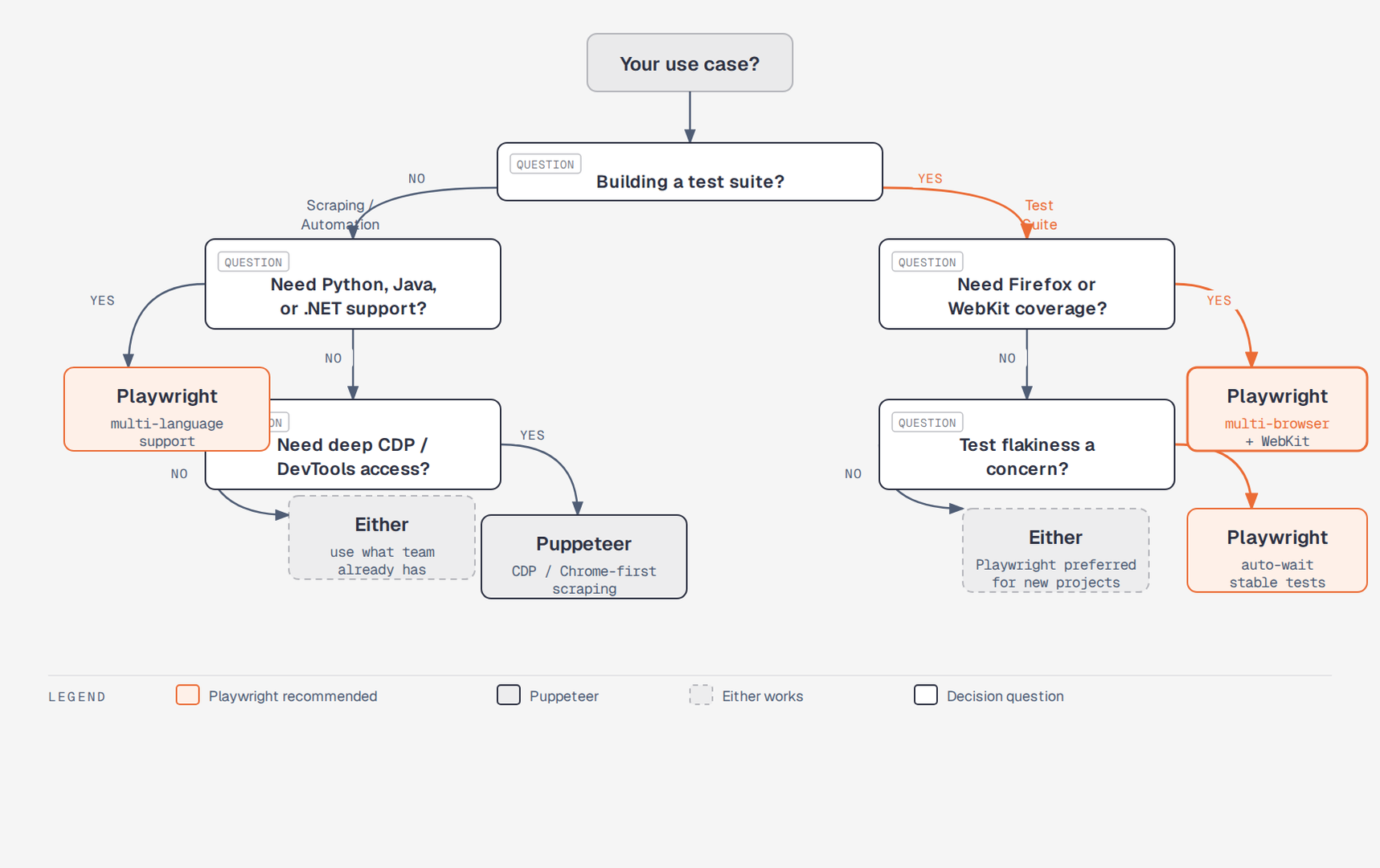
TL;DR — Quick Decision
Choose Playwright if:
- You're building an end-to-end test suite
- You need multi-browser coverage (Chrome, Firefox, WebKit/Safari) from one codebase
- You want built-in test runners, reporters, and trace viewers
- Your team works across JavaScript, TypeScript, Python, Java, or .NET
Choose Puppeteer if:
- You need Chrome-specific features or DevTools Protocol access
- You're building a scraping or automation tool (not a test suite)
- You want a smaller, lower-level dependency
- Your use case is Chrome/Chromium-only
Background
Puppeteer
Puppeteer was created by the Google Chrome team and released in 2017. It provides a high-level API over the Chrome DevTools Protocol (CDP), giving you direct programmatic control of Chromium-based browsers.
Key facts:
- Official Google Chrome team project
- JavaScript/TypeScript only (Node.js)
- Chrome and Chromium only (Firefox experimental via CDP)
- Direct CDP access for advanced use cases
- Lightweight — focused on browser control, not testing
Playwright
Playwright launched in 2020, created by former Puppeteer engineers at Microsoft. It took Puppeteer's foundation and rebuilt it with first-class multi-browser support, a more reliable execution model, and a built-in test runner.
Key facts:
- Microsoft-maintained, open source
- JavaScript, TypeScript, Python, Java, .NET
- Chrome, Firefox, and WebKit (Safari engine) natively
- Auto-wait mechanisms eliminate most timing issues
- Full test automation platform with runner, reporter, and tooling
Feature-by-Feature Comparison
Language Support
| Language | Playwright | Puppeteer |
|---|---|---|
| JavaScript | ✓ | ✓ |
| TypeScript | ✓ (first-class) | ✓ |
| Python | ✓ (playwright-python) | ✗ |
| Java | ✓ | ✗ |
| .NET (C#) | ✓ | ✗ |
Playwright's multi-language support is a significant advantage for polyglot teams. Python teams using Playwright can share selectors, page objects, and CI configurations with their Node.js counterparts.
Browser Support
| Browser | Playwright | Puppeteer |
|---|---|---|
| Chrome/Chromium | ✓ | ✓ |
| Firefox | ✓ (native) | ✓ (experimental) |
| WebKit (Safari) | ✓ | ✗ |
| Edge | ✓ (Chromium) | ✓ (Chromium) |
Playwright's native Firefox and WebKit support is its most decisive advantage for testing. If you need to verify behavior across real browser engines — not just Chromium variants — Playwright is the only option of the two.
Reliability and Auto-Waiting
This is where Playwright has the most meaningful architectural advantage.
Puppeteer uses explicit waits. You write code like:
await page.waitForSelector('.my-element', { visible: true });
await page.click('.my-element');
Miss a wait or mistime it and tests become flaky. Debugging timing issues in Puppeteer is a common pain point.
Playwright auto-waits before performing actions. Before clicking, Playwright waits for the element to be:
- Attached to the DOM
- Visible and not hidden
- Stable (not animating)
- Enabled and not disabled
- Receives focus (for checkboxes/inputs)
// Playwright: just click — it waits automatically
await page.click('.my-element');
This eliminates a whole category of flaky tests. In practice, Playwright test suites are noticeably more stable than equivalent Puppeteer suites once a codebase grows past a few dozen tests.
Performance
For scraping workloads, Puppeteer is slightly faster. It has less overhead per operation because it skips the auto-wait machinery when you don't need it.
For test automation workloads, Playwright is faster at scale. Its parallel execution model (multiple browser contexts in one browser process) means you can run hundreds of tests with far fewer browser processes than Puppeteer's typical setup.
// Playwright parallel contexts — efficient browser usage
const browser = await chromium.launch();
const [context1, context2, context3] = await Promise.all([
  browser.newContext(),
  browser.newContext(),
  browser.newContext()
]);
// All three contexts share one browser process
Debugging and Tooling
Playwright's tooling ecosystem:
playwright codegen— record interactions as test code- Playwright Inspector — step-through debugger with DOM inspection
- Trace Viewer — full timeline of test execution with screenshots and network logs
--uimode — visual test runner with live reloading- VS Code extension with breakpoints
Puppeteer's tooling:
slowMooption to slow down actions for visual debuggingheadless: falsefor watching execution- DevTools Protocol directly for deep Chrome inspection
- No built-in test runner or report generator
If you're building a test suite, Playwright's tooling saves significant debugging time. The Trace Viewer alone is worth the switch for teams dealing with CI failures they can't reproduce locally.
API Comparison
Both libraries share similar core APIs — not surprising given the shared lineage.
// Navigate to a page — identical pattern
await page.goto('https://example.com');

// Playwright
const element = await page.locator('text=Submit');
await element.click();

// Puppeteer
const element = await page.$('button[type="submit"]');
await element.click();
Key API differences:
Playwright's locator() API is more expressive and composable than Puppeteer's querySelector-style selectors. Playwright locators are lazy — they don't resolve until an action is performed, which is what enables auto-waiting.
// Playwright locators — composable, lazy, auto-waiting
const row = page.locator('table tbody tr').filter({ hasText: 'John' });
await row.locator('button.edit').click();

// Puppeteer equivalent — more verbose
const rows = await page.$$('table tbody tr');
let targetRow = null;
for (const row of rows) {
  const text = await row.evaluate(el => el.textContent);
  if (text.includes('John')) { targetRow = row; break; }
}
const editBtn = await targetRow.$('button.edit');
await editBtn.click();
Network Interception
Both support network request interception, but with different APIs.
// Playwright route interception
await page.route('**/api/users', route => {
  route.fulfill({
    status: 200,
    contentType: 'application/json',
    body: JSON.stringify([{ id: 1, name: 'Test User' }])
  });
});

// Puppeteer request interception
await page.setRequestInterception(true);
page.on('request', request => {
  if (request.url().includes('/api/users')) {
    request.respond({
      status: 200,
      contentType: 'application/json',
      body: JSON.stringify([{ id: 1, name: 'Test User' }])
    });
  } else {
    request.continue();
  }
});
Playwright's route() API is cleaner and doesn't require calling request.continue() for every non-intercepted request.
Use Case Analysis
Web Scraping
Winner: Puppeteer (slight edge) or either
For scraping, the extra overhead of Playwright's auto-waiting isn't needed — you control the timing. Puppeteer's direct CDP access is useful for scraping-specific tasks like capturing screenshots, extracting network responses, and controlling browser resources.
That said, Playwright works perfectly well for scraping. If your team already uses Playwright for tests, use it for scraping too rather than maintaining two dependencies.
# Playwright in Python — good for scraping in Python-heavy teams
from playwright.sync_api import sync_playwright

with sync_playwright() as p:
    browser = p.chromium.launch(headless=True)
    page = browser.new_page()
    page.goto('https://example.com')
    data = page.locator('.product-list li').all_text_contents()
    browser.close()
End-to-End Testing
Winner: Playwright, clearly
Playwright was built for test automation. The combination of auto-waiting, multi-browser support, built-in test runner, and trace viewer makes it the better tool for E2E test suites. Puppeteer requires pairing with external test runners like Jest or Mocha, lacks native multi-browser support, and produces flakier tests without careful manual wait handling.
// Playwright test with built-in runner
import { test, expect } from '@playwright/test';

test('user can log in', async ({ page }) => {
  await page.goto('/login');
  await page.fill('[name=email]', 'user@example.com');
  await page.fill('[name=password]', 'password123');
  await page.click('button[type=submit]');
  await expect(page).toHaveURL('/dashboard');
  await expect(page.locator('h1')).toHaveText('Welcome back');
});
Chrome DevTools Protocol Access
Winner: Puppeteer
If you need low-level CDP access — custom DevTools sessions, memory profiling, coverage reporting, or advanced network conditions — Puppeteer gives you direct CDP access.
// Puppeteer direct CDP access
const client = await page.target().createCDPSession();
await client.send('Performance.enable');
const metrics = await client.send('Performance.getMetrics');
Playwright does support CDP, but it's less central to the API and some advanced CDP features have reduced access in newer versions.
CI/CD Integration
Both integrate with major CI systems, but Playwright ships with GitHub Actions configuration out of the box:
# Playwright's built-in GitHub Actions support
- name: Install Playwright Browsers
  run: npx playwright install --with-deps

- name: Run Playwright tests
  run: npx playwright test

- uses: actions/upload-artifact@v4
  if: ${{ !cancelled() }}
  with:
    name: playwright-report
    path: playwright-report/
2026 Ecosystem Status
Playwright in 2026:
- Component testing for React, Vue, and Angular
- API testing built into the test runner
- Visual regression testing with pixel-diff comparisons
- Strong enterprise adoption for E2E testing
- MCP server integration for AI-driven test generation
Puppeteer in 2026:
- Stable, mature API with few breaking changes
- Continued relevance in scraping and automation tooling
- CDP access still essential for browser profiling and DevTools integrations
- Focused community around automation rather than testing
Migration from Puppeteer to Playwright
If you're migrating an existing Puppeteer project:
// Most Puppeteer code maps directly to Playwright

// puppeteer:
const browser = await puppeteer.launch();
const page = await browser.newPage();
await page.goto(url);
const text = await page.$eval('h1', el => el.textContent);

// playwright (near-identical):
const browser = await chromium.launch();
const page = await browser.newPage();
await page.goto(url);
const text = await page.locator('h1').textContent();
Key migration points:
- Replace
page.$eval()/page.$$eval()withlocator().textContent()/locator().allTextContents() - Remove manual
waitForSelectorcalls — Playwright auto-waits - Replace
page.setRequestInterception(true)withpage.route() - Replace Jest/Mocha test wrappers with
@playwright/test
Conclusion
By 2026, the choice maps cleanly to use case.
For test automation, Playwright wins on reliability, multi-browser support, tooling, and built-in runner. Teams still on Puppeteer for testing should seriously evaluate migrating — the stability gains from auto-waiting alone justify the switch for most codebases.
For scraping and automation, either works. Puppeteer's direct CDP access and slightly lower overhead give it a marginal edge for Chrome-specific scraping, but Playwright's Python support makes it the better fit for data science and ML teams.
For deep Chrome DevTools Protocol access — profiling, custom DevTools extensions, advanced network conditions — Puppeteer remains the definitive choice.
Author

Author