7 Python Web Scraping Tips That Actually Work in 2026
Cover Image

Python remains the dominant language for web scraping, but the ecosystem has shifted dramatically since 2024. Selenium is no longer the default browser tool. requests is no longer the best HTTP library. And anti-bot systems have evolved past simple User-Agent rotation.
These tips reflect what actually works in production scraping projects right now — with complete, runnable code examples that handle real-world edge cases.
1. Choose the Right HTTP Library — httpx Over requests
The requests library served Python well for a decade, but httpx has become the better default in 2026. It supports HTTP/2 natively, handles async requests without a separate library, and provides connection pooling out of the box.
Synchronous (drop-in requests replacement):
import httpx

client = httpx.Client(
    http2=True,
    timeout=httpx.Timeout(30.0, connect=10.0),
    follow_redirects=True,
    headers={
        "User-Agent": "Mozilla/5.0 (Windows NT 10.0; Win64; x64) AppleWebKit/537.36 (KHTML, like Gecko) Chrome/131.0.0.0 Safari/537.36",
        "Accept": "text/html,application/xhtml+xml,application/xml;q=0.9,*/*;q=0.8",
        "Accept-Language": "en-US,en;q=0.9",
        "Accept-Encoding": "gzip, deflate, br",
    },
)

response = client.get("https://example.com/products")
print(response.status_code, len(response.text))
Async (10–50x faster for bulk scraping):
import httpx
import asyncio

async def fetch(client: httpx.AsyncClient, url: str) -> str:
    response = await client.get(url)
    response.raise_for_status()
    return response.text

async def scrape_all(urls: list[str], concurrency: int = 10) -> list[str]:
    semaphore = asyncio.Semaphore(concurrency)
    async with httpx.AsyncClient(http2=True, timeout=30.0) as client:
        async def bounded_fetch(url):
            async with semaphore:
                return await fetch(client, url)
        return await asyncio.gather(*[bounded_fetch(u) for u in urls])

urls = [f"https://example.com/page/{i}" for i in range(1, 101)]
results = asyncio.run(scrape_all(urls))
print(f"Fetched {len(results)} pages")
The semaphore caps concurrent requests at 10. Without it, sending 100 simultaneous requests trips rate limiters on most sites within seconds.
Why not aiohttp? It still works, but httpx gives you sync and async in one library, HTTP/2 support, and a cleaner API. One dependency instead of two.
2. Use Playwright for Browser Automation — Not Selenium
Selenium dominated browser automation for years, but Playwright has overtaken it for scraping in 2026. Faster execution, better stealth defaults, native async support, and automatic wait handling.
from playwright.async_api import async_playwright
import asyncio

async def scrape_dynamic_page(url: str) -> dict:
    async with async_playwright() as p:
        browser = await p.chromium.launch(headless=True)
        context = await browser.new_context(
            viewport={"width": 1920, "height": 1080},
            user_agent="Mozilla/5.0 (Windows NT 10.0; Win64; x64) AppleWebKit/537.36 (KHTML, like Gecko) Chrome/131.0.0.0 Safari/537.36",
        )
        page = await context.new_page()

        # Block unnecessary resources for speed
        await page.route("**/*.{png,jpg,jpeg,gif,svg,woff,woff2}", lambda route: route.abort())

        await page.goto(url, wait_until="domcontentloaded")
        await page.wait_for_selector(".product-card", timeout=15000)

        products = await page.evaluate("""
            () => Array.from(document.querySelectorAll('.product-card')).map(el => ({
                name: el.querySelector('.title')?.textContent?.trim(),
                price: el.querySelector('.price')?.textContent?.trim(),
                url: el.querySelector('a')?.href,
            }))
        """)

        await browser.close()
        return products

data = asyncio.run(scrape_dynamic_page("https://example.com/shop"))
Key advantages over Selenium:
page.route()blocks images, fonts, and tracking scripts — 2–5x faster page loadswait_for_selector()replaces Selenium's fragileWebDriverWaitchainspage.evaluate()runs JavaScript directly in the page context — no separateexecute_scriptcall- Native async — run multiple browser tabs concurrently without threading
Handling infinite scroll:
async def scroll_to_bottom(page, max_scrolls: int = 20):
    previous_height = 0
    for _ in range(max_scrolls):
        current_height = await page.evaluate("document.body.scrollHeight")
        if current_height == previous_height:
            break
        await page.evaluate("window.scrollTo(0, document.body.scrollHeight)")
        await page.wait_for_timeout(1500)
        previous_height = current_height
This checks scroll height after each scroll instead of blindly sleeping — it stops automatically when no new content loads.
3. Parse HTML with selectolax for Speed, BeautifulSoup for Flexibility
BeautifulSoup remains a good default for HTML parsing, but selectolax (backed by the Modest C engine) parses 5–20x faster on large documents. For high-volume scraping, the difference matters.
selectolax — fast extraction:
from selectolax.parser import HTMLParser

html = httpx.get("https://example.com/listings").text
tree = HTMLParser(html)

items = []
for node in tree.css("div.listing-card"):
    title = node.css_first("h3.title")
    price = node.css_first("span.price")
    items.append({
        "title": title.text(strip=True) if title else None,
        "price": price.text(strip=True) if price else None,
    })
BeautifulSoup — when you need fuzzy matching:
from bs4 import BeautifulSoup

soup = BeautifulSoup(html, "lxml")
# Find elements with partial attribute matches
cards = soup.find_all("div", class_=lambda c: c and "product" in c)
# Navigate siblings, parents — selectolax can't do this easily
for card in cards:
    next_section = card.find_next_sibling("div")
Decision rule: If you are extracting structured data from well-known selectors at high volume, use selectolax. If you need to navigate messy HTML, search by partial attributes, or walk the DOM tree, use BeautifulSoup with the lxml parser.
4. Build Anti-Detection into Your Pipeline from Day One
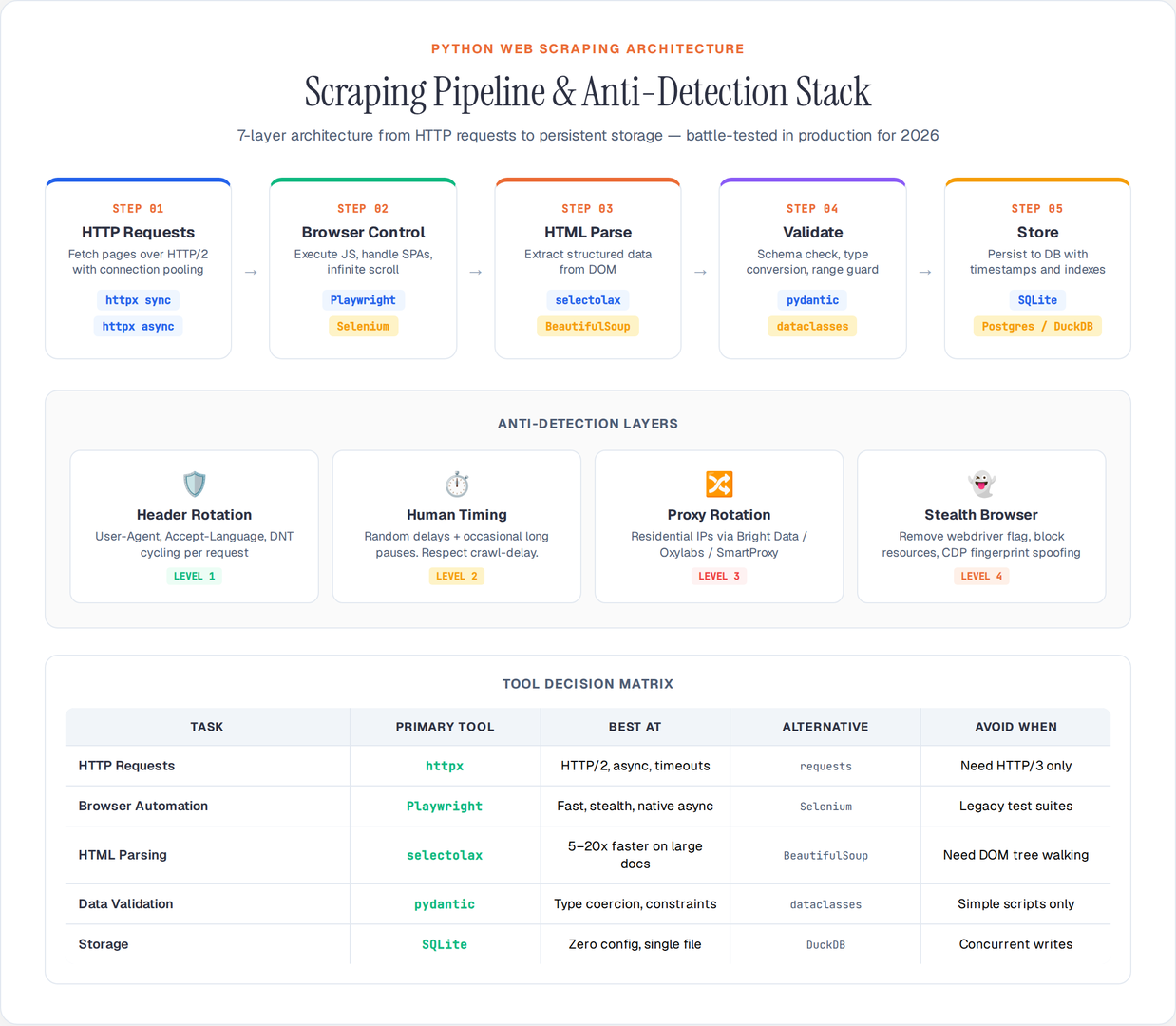
Anti-bot detection is not an afterthought — it determines whether your scraper survives past the first 100 requests. In 2026, Cloudflare Turnstile, Akamai Bot Manager, and DataDome fingerprint TLS handshakes, JavaScript execution patterns, and behavioral signals.
Level 1: Header rotation (baseline for any scraper):
import random

USER_AGENTS = [
    "Mozilla/5.0 (Windows NT 10.0; Win64; x64) AppleWebKit/537.36 (KHTML, like Gecko) Chrome/131.0.0.0 Safari/537.36",
    "Mozilla/5.0 (Macintosh; Intel Mac OS X 10_15_7) AppleWebKit/537.36 (KHTML, like Gecko) Chrome/131.0.0.0 Safari/537.36",
    "Mozilla/5.0 (X11; Linux x86_64) AppleWebKit/537.36 (KHTML, like Gecko) Chrome/131.0.0.0 Safari/537.36",
    "Mozilla/5.0 (Windows NT 10.0; Win64; x64; rv:134.0) Gecko/20100101 Firefox/134.0",
]

def get_headers():
    return {
        "User-Agent": random.choice(USER_AGENTS),
        "Accept": "text/html,application/xhtml+xml,application/xml;q=0.9,*/*;q=0.8",
        "Accept-Language": "en-US,en;q=0.9",
        "Accept-Encoding": "gzip, deflate, br",
        "DNT": "1",
        "Connection": "keep-alive",
        "Upgrade-Insecure-Requests": "1",
    }
Level 2: Request timing that mimics human behavior:
import time
import random

def human_delay(min_sec: float = 1.5, max_sec: float = 4.0):
    """Random delay with occasional longer pauses."""
    if random.random() < 0.1:  # 10% chance of longer pause
        time.sleep(random.uniform(8.0, 15.0))
    else:
        time.sleep(random.uniform(min_sec, max_sec))
Level 3: Proxy rotation for sustained scraping:
import httpx

proxies = [
    "http://user:pass@proxy1.example.com:8080",
    "http://user:pass@proxy2.example.com:8080",
    "http://user:pass@proxy3.example.com:8080",
]

def get_client_with_proxy() -> httpx.Client:
    proxy = random.choice(proxies)
    return httpx.Client(
        proxy=proxy,
        http2=True,
        timeout=30.0,
        headers=get_headers(),
    )
Level 4: Stealth browser with Playwright:
async def stealth_browser():
    async with async_playwright() as p:
        browser = await p.chromium.launch(
            headless=True,
            args=[
                "--disable-blink-features=AutomationControlled",
                "--disable-features=IsolateOrigins,site-per-process",
            ],
        )
        context = await browser.new_context(
            viewport={"width": 1920, "height": 1080},
            locale="en-US",
            timezone_id="America/New_York",
        )
        # Remove navigator.webdriver flag
        await context.add_init_script("""
            Object.defineProperty(navigator, 'webdriver', { get: () => undefined });
        """)
        return browser, context
For sites with aggressive anti-bot (Cloudflare Turnstile, PerimeterX), consider scraping APIs like Bright Data Web Unlocker or Oxylabs — they handle CAPTCHA solving, TLS fingerprinting, and proxy rotation at the infrastructure level.
5. Structure Your Pipeline: Fetch → Parse → Validate → Store
Most scraping tutorials show one-off scripts. Production scrapers need a pipeline — separate stages that can be tested, retried, and monitored independently.
import httpx
import json
import sqlite3
import logging
from dataclasses import dataclass, asdict
from selectolax.parser import HTMLParser

logging.basicConfig(
    level=logging.INFO,
    format="%(asctime)s [%(levelname)s] %(message)s",
    handlers=[
        logging.FileHandler("scraper.log"),
        logging.StreamHandler(),
    ],
)
log = logging.getLogger(__name__)

@dataclass
class Product:
    name: str
    price: float
    url: str
    currency: str = "USD"

# Stage 1: Fetch
def fetch_page(client: httpx.Client, url: str) -> str | None:
    try:
        response = client.get(url)
        response.raise_for_status()
        log.info(f"Fetched {url} ({response.status_code})")
        return response.text
    except httpx.HTTPStatusError as e:
        log.warning(f"HTTP {e.response.status_code} for {url}")
        return None
    except httpx.RequestError as e:
        log.error(f"Request failed for {url}: {e}")
        return None

# Stage 2: Parse
def parse_products(html: str) -> list[Product]:
    tree = HTMLParser(html)
    products = []
    for node in tree.css("div.product-card"):
        name_el = node.css_first("h3")
        price_el = node.css_first(".price")
        link_el = node.css_first("a")
        if name_el and price_el:
            price_text = price_el.text(strip=True).replace("$", "").replace(",", "")
            try:
                price = float(price_text)
            except ValueError:
                continue
            products.append(Product(
                name=name_el.text(strip=True),
                price=price,
                url=link_el.attributes.get("href", "") if link_el else "",
            ))
    return products

# Stage 3: Validate
def validate(product: Product) -> bool:
    if not product.name or len(product.name) < 2:
        return False
    if product.price <= 0 or product.price > 100_000:
        return False
    return True

# Stage 4: Store
def store_products(products: list[Product], db_path: str = "products.db"):
    conn = sqlite3.connect(db_path)
    conn.execute("""
        CREATE TABLE IF NOT EXISTS products (
            name TEXT, price REAL, url TEXT, currency TEXT,
            scraped_at TIMESTAMP DEFAULT CURRENT_TIMESTAMP
        )
    """)
    for p in products:
        conn.execute(
            "INSERT INTO products (name, price, url, currency) VALUES (?, ?, ?, ?)",
            (p.name, p.price, p.url, p.currency),
        )
    conn.commit()
    log.info(f"Stored {len(products)} products")
    conn.close()

# Run pipeline
def run():
    client = httpx.Client(http2=True, timeout=30.0, headers=get_headers())
    all_products = []

    for page_num in range(1, 11):
        html = fetch_page(client, f"https://example.com/products?page={page_num}")
        if not html:
            continue
        products = parse_products(html)
        valid = [p for p in products if validate(p)]
        all_products.extend(valid)
        log.info(f"Page {page_num}: {len(valid)}/{len(products)} valid products")
        human_delay()

    store_products(all_products)
    client.close()

if __name__ == "__main__":
    run()
Why this structure matters:
- Fetch failures don't crash the parser
- Validation catches garbage data before it reaches your database
- Logging tells you exactly where a run failed — page 47 returned 403, or page 92 had malformed prices
- Each stage can be unit-tested independently
6. Handle Errors with Retry Logic and Circuit Breakers
Network requests fail. Servers return 429 (rate limited), 503 (overloaded), or simply time out. Your scraper needs to handle all of these gracefully without manual intervention.
Retry with exponential backoff:
import httpx
import time
import logging

log = logging.getLogger(__name__)

def fetch_with_retry(
    client: httpx.Client,
    url: str,
    max_retries: int = 3,
    backoff_factor: float = 2.0,
) -> httpx.Response | None:
    for attempt in range(max_retries + 1):
        try:
            response = client.get(url)
            if response.status_code == 429:
                retry_after = int(response.headers.get("Retry-After", 30))
                log.warning(f"Rate limited on {url}, waiting {retry_after}s")
                time.sleep(retry_after)
                continue
            response.raise_for_status()
            return response
        except httpx.TimeoutException:
            wait = backoff_factor ** attempt
            log.warning(f"Timeout on {url}, retry {attempt + 1}/{max_retries} after {wait}s")
            time.sleep(wait)
        except httpx.HTTPStatusError as e:
            if e.response.status_code in (500, 502, 503):
                wait = backoff_factor ** attempt
                log.warning(f"Server error {e.response.status_code} on {url}, retry after {wait}s")
                time.sleep(wait)
            else:
                log.error(f"HTTP {e.response.status_code} on {url} — not retrying")
                return None
    log.error(f"All retries exhausted for {url}")
    return None
Circuit breaker pattern — stop hammering a dead server:
class CircuitBreaker:
    def __init__(self, failure_threshold: int = 5, reset_timeout: float = 60.0):
        self.failure_count = 0
        self.failure_threshold = failure_threshold
        self.reset_timeout = reset_timeout
        self.last_failure_time = 0.0
        self.is_open = False

    def record_failure(self):
        self.failure_count += 1
        self.last_failure_time = time.time()
        if self.failure_count >= self.failure_threshold:
            self.is_open = True
            log.warning(f"Circuit breaker OPEN after {self.failure_count} failures")

    def record_success(self):
        self.failure_count = 0
        self.is_open = False

    def can_proceed(self) -> bool:
        if not self.is_open:
            return True
        # Check if reset timeout has elapsed
        if time.time() - self.last_failure_time > self.reset_timeout:
            self.is_open = False
            self.failure_count = 0
            log.info("Circuit breaker RESET — retrying")
            return True
        return False
After 5 consecutive failures, the circuit breaker stops sending requests for 60 seconds. This prevents your scraper from wasting time (and getting IP-banned) while a server is down.
7. Check robots.txt and Respect Rate Limits — It Keeps You Running
Ignoring robots.txt and rate limits is the fastest way to get permanently blocked. Respecting them is both ethical and practical — sites that see well-behaved crawlers are less likely to invest in blocking you.
from urllib.robotparser import RobotFileParser
from urllib.parse import urlparse
import httpx

class RobotsChecker:
    def __init__(self):
        self._parsers: dict[str, RobotFileParser] = {}

    def can_fetch(self, url: str, user_agent: str = "*") -> bool:
        parsed = urlparse(url)
        base = f"{parsed.scheme}://{parsed.netloc}"
        if base not in self._parsers:
            rp = RobotFileParser()
            rp.set_url(f"{base}/robots.txt")
            try:
                rp.read()
            except Exception:
                return True  # If robots.txt is unreachable, assume allowed
            self._parsers[base] = rp
        return self._parsers[base].can_fetch(user_agent, url)

    def crawl_delay(self, url: str, user_agent: str = "*") -> float | None:
        parsed = urlparse(url)
        base = f"{parsed.scheme}://{parsed.netloc}"
        if base in self._parsers:
            return self._parsers[base].crawl_delay(user_agent)
        return None

robots = RobotsChecker()

# Before scraping any URL
if robots.can_fetch(target_url):
    delay = robots.crawl_delay(target_url)
    if delay:
        time.sleep(delay)
    response = client.get(target_url)
else:
    log.info(f"Blocked by robots.txt: {target_url}")
Additional rate-limiting best practices:
- Honor
Crawl-delaydirectives when present - Start slow (2–4 second delays) and only increase speed if no blocks occur
- Cache responses locally — never re-scrape a page you already have
- Use conditional requests (
If-Modified-Since,If-None-Match) to avoid transferring unchanged pages - Log your request rate and block rate; if blocks exceed 5%, slow down immediately
The Stack That Works in 2026
| Task | Recommended Tool | Alternative |
|---|---|---|
| HTTP requests | httpx (sync + async, HTTP/2) | requests (sync only) |
| Browser automation | Playwright (async, stealth) | Selenium (legacy projects) |
| HTML parsing | selectolax (speed) | BeautifulSoup + lxml (flexibility) |
| Data validation | pydantic or dataclasses | Manual checks |
| Storage (small) | SQLite or JSON lines | CSV |
| Storage (large) | PostgreSQL or DuckDB | Parquet files |
| Proxy management | Bright Data, Oxylabs | Self-hosted rotating proxies |
The gap between a scraper that works once and a scraper that runs reliably for months is error handling, pipeline structure, and anti-detection. Build those into your architecture from the start — retrofitting them after your IP gets banned is significantly harder.