Web Scraping Python vs Node.js: Which Should You Use in 2026?
Cover Image
Introduction
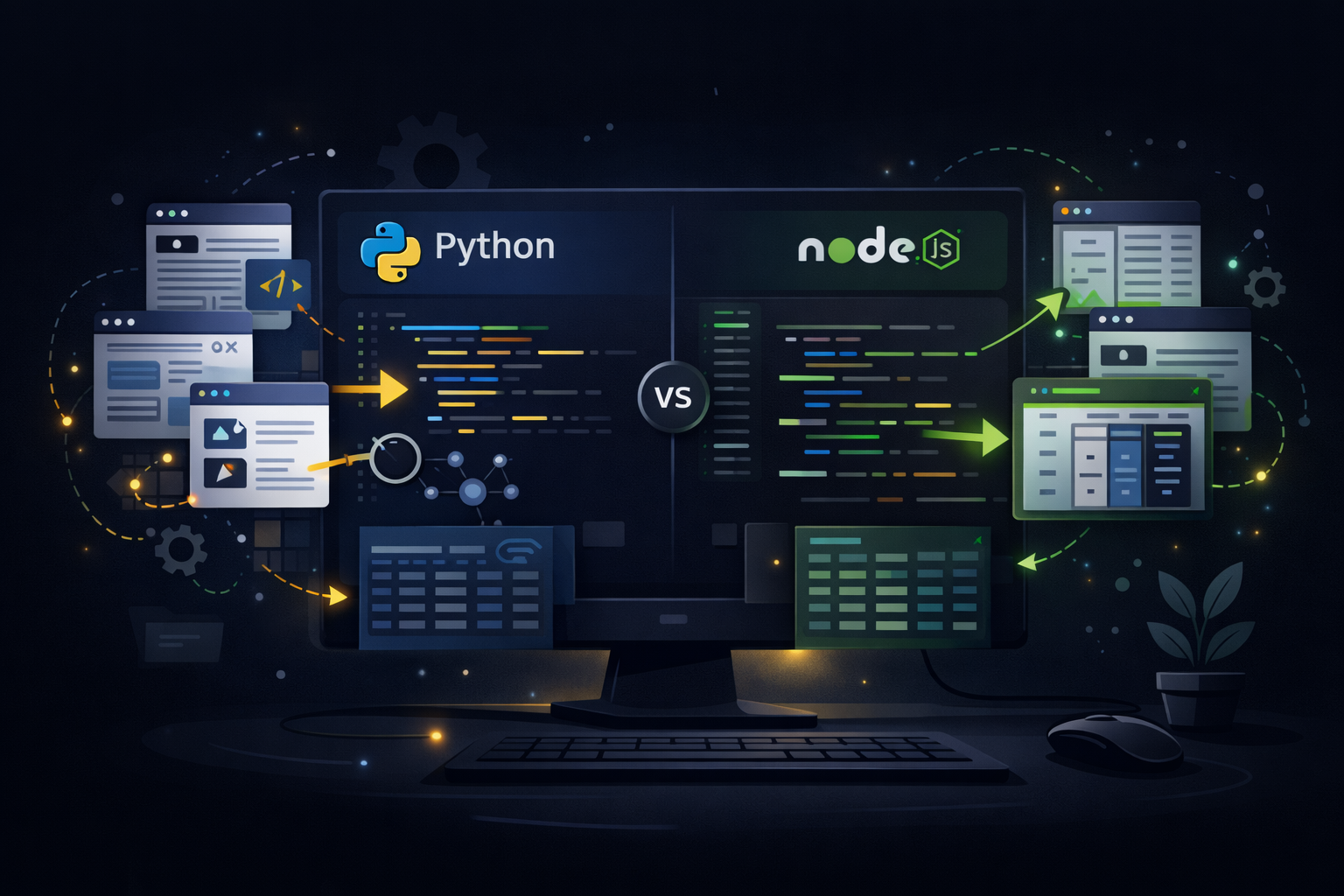
Python and Node.js are the two dominant languages for web scraping in 2026. Both have mature ecosystems, active communities, and production-proven tooling. The question isn't which is "better" — it's which fits your stack, your team, and your specific scraping requirements.
This guide compares them directly across the criteria that matter: library ecosystem, performance, async handling, browser automation, data processing, and deployment.
The Short Answer
Python wins for:
- Data science and ML pipelines downstream of scraping
- Teams already in Python
- AI/NLP-based content extraction
- Scientific data collection
Node.js wins for:
- JavaScript-heavy sites requiring real browser execution
- Real-time scraping with streaming responses
- Teams already in JavaScript/TypeScript
- Serverless and edge deployment
Either works equally well for: General-purpose HTTP scraping, API harvesting, and most production scraping use cases.
Library Ecosystem
Python Scraping Libraries
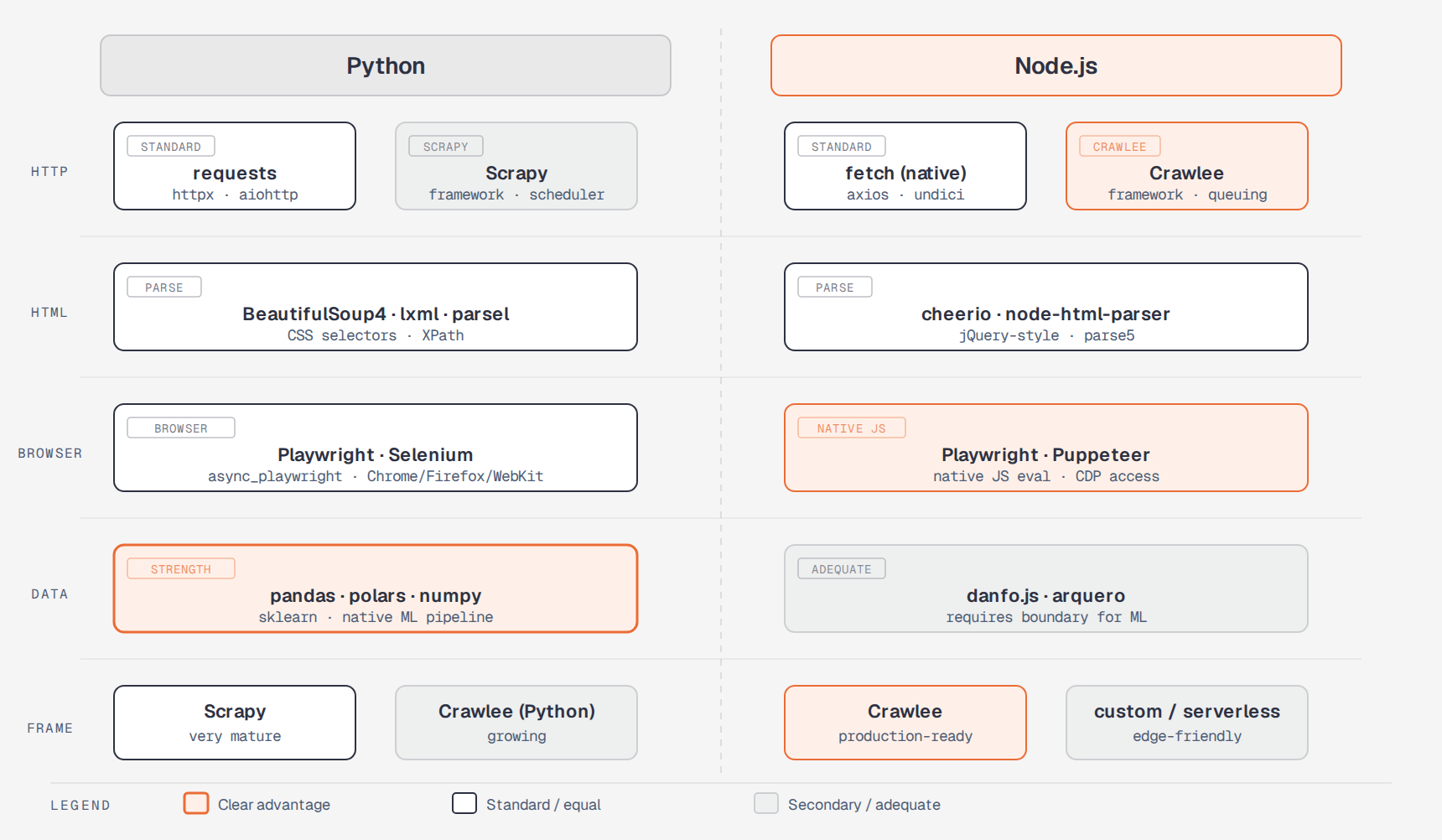
HTTP & HTML:
- requests — de facto standard for HTTP in Python. Simple, readable, synchronous.
- httpx — modern async-capable HTTP client with a requests-compatible API
- aiohttp — high-performance async HTTP for concurrent scraping
- BeautifulSoup4 — HTML/XML parsing with CSS selectors and XPath
- lxml — fast C-based XML/HTML parser with full XPath support
- parsel — Scrapy's selector library, usable standalone
Browser automation:
- Playwright (Python) — full cross-browser automation, excellent for JavaScript-heavy sites
- Selenium — legacy but still widely used; broad browser support
- pyppeteer — Puppeteer port for Python (less maintained by 2026)
- mechanize — legacy stateful browser for form-heavy sites
Frameworks:
- Scrapy — production-grade scraping framework with built-in middleware, pipelines, and scheduling
- Crawlee (Python port) — Apify's crawling framework now available in Python
Node.js Scraping Libraries
HTTP & HTML:
- axios / node-fetch / native
fetch— HTTP clients for Node.js - undici — Node.js core HTTP client, fast and low-level
- cheerio — jQuery-style HTML parsing, fast and familiar for JS devs
- parse5 — spec-compliant HTML5 parser
- node-html-parser — lightweight fast HTML parser
Browser automation:
- Playwright — same library as Python, Node.js is the first-class runtime
- Puppeteer — Chrome DevTools Protocol, Google Chrome team
- Crawlee — Apify's Node.js scraping framework with Playwright and Cheerio support
Frameworks:
- Crawlee — mature, production-proven scraping framework for Node.js
- Scrapy JS — Scrapy-style framework ports for Node.js
Performance
Raw HTTP Performance
For pure HTTP scraping (no browser), Node.js has an edge due to its non-blocking event loop architecture. Node handles thousands of concurrent HTTP requests efficiently with a single thread:
// Node.js: efficient concurrent scraping with native fetch
const urls = [...]; // 1000 URLs

const results = await Promise.allSettled(
  urls.map(url =>
    fetch(url, { signal: AbortSignal.timeout(10000) })
      .then(r => r.text())
  )
);
Python can match this with asyncio, but the async model requires more explicit setup:
# Python: equivalent concurrent scraping with aiohttp
import asyncio
import aiohttp

async def scrape_all(urls):
async with aiohttp.ClientSession() as session:
tasks = [fetch_url(session, url) for url in urls]
return await asyncio.gather(*tasks, return_exceptions=True)
Benchmark reality (2026): For I/O-bound scraping (waiting on network), both perform similarly at scale. Python's asyncio has closed the gap considerably, and for most scraping workloads, the bottleneck is network latency and target rate limits, not language throughput.
Data Processing Performance
Python wins decisively for data processing downstream of scraping. pandas, polars, and numpy give Python a massive advantage when you need to clean, transform, and analyze scraped data:
import polars as pl

# Python: efficient large dataset processing post-scrape
df = pl.read_ndjson('scraped_data.ndjson')
result = (
    df
    .filter(pl.col('price') > 0)
    .group_by('category')
    .agg([
        pl.col('price').mean().alias('avg_price'),
        pl.col('price').median().alias('median_price'),
        pl.len().alias('count')
    ])
    .sort('count', descending=True)
)
JavaScript equivalents (danfo.js, arquero) exist but lack the depth and performance of the Python data science stack.
Async and Concurrency Models
Python Asyncio
Python's asyncio is explicit and requires async/await throughout the call stack:
import asyncio
import aiohttp
from bs4 import BeautifulSoup

async def scrape_page(session, url, semaphore):
    async with semaphore:
        try:
            async with session.get(url, timeout=aiohttp.ClientTimeout(total=15)) as response:
                html = await response.text()
                soup = BeautifulSoup(html, 'lxml')
                return {
                    'url': url,
                    'title': soup.find('h1').get_text(strip=True) if soup.find('h1') else None,
                    'status': response.status
                }
        except Exception as e:
            return {'url': url, 'error': str(e)}

async def scrape_batch(urls, max_concurrent=20):
    semaphore = asyncio.Semaphore(max_concurrent)
    async with aiohttp.ClientSession() as session:
        tasks = [scrape_page(session, url, semaphore) for url in urls]
        return await asyncio.gather(*tasks)
Node.js Async
Node.js async is the language's natural mode — no mode-switching between sync and async worlds:
import { setTimeout } from 'timers/promises';

async function scrapeWithRetry(url, maxRetries = 3) {
  for (let attempt = 0; attempt < maxRetries; attempt++) {
    try {
      const response = await fetch(url, {
        signal: AbortSignal.timeout(15000),
        headers: { 'User-Agent': 'Mozilla/5.0...' }
      });
      if (!response.ok) throw new Error(`HTTP ${response.status}`);
      return await response.text();
    } catch (err) {
      if (attempt === maxRetries - 1) throw err;
      await setTimeout(1000 * (attempt + 1)); // exponential backoff
    }
  }
}

// Concurrent scraping with concurrency limit
async function scrapeAll(urls, concurrency = 20) {
  const results = [];
  for (let i = 0; i < urls.length; i += concurrency) {
    const batch = urls.slice(i, i + concurrency);
    const batchResults = await Promise.allSettled(batch.map(url => scrapeWithRetry(url)));
    results.push(...batchResults);
  }
  return results;
}
Node.js async is somewhat simpler because the runtime is built around non-blocking I/O from the ground up.
Browser Automation Comparison
For JavaScript-heavy sites, both languages use Playwright as their primary tool, but the Node.js experience is marginally smoother because Playwright's primary development target is Node.js.
Python (Playwright)
from playwright.async_api import async_playwright
import asyncio

async def scrape_spa(url: str) -> dict:
    async with async_playwright() as p:
        browser = await p.chromium.launch(headless=True)
        context = await browser.new_context(
            user_agent='Mozilla/5.0 (Macintosh; Intel Mac OS X 10_15_7)...',
            viewport={'width': 1280, 'height': 720}
        )
        page = await context.new_page()

        # Block images and fonts to speed up scraping
        await page.route('**/*.{png,jpg,jpeg,gif,webp,woff,woff2}',
                         lambda route: route.abort())

        await page.goto(url, wait_until='networkidle')

        data = await page.evaluate('''() => {
            return Array.from(document.querySelectorAll('.product-card')).map(card => ({
                name: card.querySelector('h2')?.textContent,
                price: card.querySelector('.price')?.textContent,
            }));
        }''')

        await browser.close()
        return data
Node.js (Playwright)
import { chromium } from 'playwright';

async function scrapeSPA(url) {
  const browser = await chromium.launch({ headless: true });
  const context = await browser.newContext({
    userAgent: 'Mozilla/5.0 (Macintosh; Intel Mac OS X 10_15_7)...',
    viewport: { width: 1280, height: 720 }
  });
  const page = await context.newPage();

  // Block images and fonts
  await page.route(/\.(png|jpg|jpeg|gif|webp|woff|woff2)$/, route => route.abort());

  await page.goto(url, { waitUntil: 'networkidle' });

  const data = await page.evaluate(() =>
    Array.from(document.querySelectorAll('.product-card')).map(card => ({
      name: card.querySelector('h2')?.textContent,
      price: card.querySelector('.price')?.textContent,
    }))
  );

  await browser.close();
  return data;
}
Both are near-identical. The Node.js version is slightly cleaner because page.evaluate() runs JavaScript natively — no context switching between the scraping language and the browser's JavaScript.
Production Frameworks
Scrapy (Python)
Scrapy remains the most battle-tested scraping framework in either ecosystem for large-scale production deployments:
import scrapy

class ProductSpider(scrapy.Spider):
    name = 'products'
    start_urls = ['https://example.com/products']

    custom_settings = {
        'CONCURRENT_REQUESTS': 16,
        'DOWNLOAD_DELAY': 0.5,
        'RETRY_TIMES': 3,
        'AUTOTHROTTLE_ENABLED': True,
        'ITEM_PIPELINES': {
            'myproject.pipelines.DatabasePipeline': 300,
            'myproject.pipelines.ValidationPipeline': 100,
        }
    }

    def parse(self, response):
        for product in response.css('.product-card'):
            yield {
                'name': product.css('h2::text').get(),
                'price': product.css('.price::text').get(),
                'url': response.urljoin(product.css('a::attr(href)').get())
            }

        next_page = response.css('a.next-page::attr(href)').get()
        if next_page:
            yield response.follow(next_page, self.parse)
Scrapy's built-in middleware system handles robots.txt, rate limiting, retries, cookies, and proxy rotation with minimal custom code.
Crawlee (Node.js)
Crawlee is the closest Node.js equivalent to Scrapy's production orientation:
import { PlaywrightCrawler, Dataset } from 'crawlee';

const crawler = new PlaywrightCrawler({
  maxConcurrency: 10,
  maxRequestRetries: 3,
  requestHandler: async ({ request, page, enqueueLinks }) => {
    const products = await page.$$eval('.product-card', cards =>
      cards.map(card => ({
        name: card.querySelector('h2')?.textContent,
        price: card.querySelector('.price')?.textContent,
      }))
    );

    await Dataset.pushData(products);

    await enqueueLinks({
      selector: 'a.next-page',
      baseUrl: request.loadedUrl
    });
  }
});

await crawler.run(['https://example.com/products']);
Crawlee handles queuing, deduplication, retries, and storage automatically. It's more concise than Scrapy for simpler use cases but has less built-in middleware for enterprise scenarios.
Data Pipeline Integration
This is Python's strongest advantage. If scraped data feeds into analysis, ML models, or data science workflows, Python eliminates an entire language boundary:
import asyncio
import polars as pl
from playwright.async_api import async_playwright

async def scrape_and_analyze(urls):
    # Scrape
    data = await scrape_all_urls(urls)

    # Process directly in the same runtime
    df = pl.DataFrame(data)

    analysis = (
        df
        .filter(pl.col('price').is_not_null())
        .with_columns([
            pl.col('price').str.replace('[^0-9.]', '').cast(pl.Float64).alias('price_float')
        ])
        .group_by('category')
        .agg(pl.col('price_float').mean().alias('avg_price'))
    )

    # Feed directly into ML pipeline
    from sklearn.preprocessing import StandardScaler
    scaler = StandardScaler()
    # ... continue analysis
In Node.js, this pipeline boundary requires writing to disk, calling a Python subprocess, or using a REST API — all adding latency and complexity.
Deployment Considerations
Serverless and Edge
Node.js has better support for serverless scraping:
// Vercel Edge Function / Cloudflare Worker compatible
export default async function handler(request) {
  const { url } = await request.json();
  const response = await fetch(url);
  const html = await response.text();
  // Parse and return
  return Response.json({ content: html });
}
Python works well with AWS Lambda and Google Cloud Functions but has a slower cold start with heavier scraping dependencies (lxml, Playwright browsers).
Containerized Deployment
Both work equally well in Docker containers. Python images tend to be heavier when including data science dependencies:
# Node.js scraping container (~400MB with Playwright browsers)
FROM node:22-slim
RUN npx playwright install-deps chromium
COPY . .
RUN npm install
CMD ["node", "scraper.js"]

# Python scraping container (~600MB with pandas + Playwright)
FROM python:3.12-slim
RUN pip install playwright pandas scrapy
RUN playwright install chromium
COPY . .
CMD ["python", "scraper.py"]
Choosing Between Them
| Criterion | Python | Node.js |
|---|---|---|
| HTTP scraping performance | Equal at scale | Equal at scale |
| Browser automation | Excellent | Excellent (marginally smoother) |
| Data processing | Strong (pandas, polars, sklearn) | Adequate |
| ML/AI pipeline integration | Native | Requires boundary |
| Async model | Good (asyncio) | Natural |
| Serverless deployment | Adequate | Better |
| Team familiarity (web devs) | Lower | Higher |
| Team familiarity (data teams) | Higher | Lower |
| Framework maturity | Scrapy (very mature) | Crawlee (mature) |
Conclusion
The honest answer in 2026: the language matters less than the ecosystem around the scraping work.
If your scraped data feeds into data analysis, machine learning, or scientific computing, Python wins on integration alone. The ability to scrape, clean, analyze, and model without crossing a language boundary is a real productivity advantage.
If you're building scraping as part of a JavaScript-heavy product — a browser extension, a web app with server-side scraping, or a Node.js API — stay in Node.js. The Crawlee + Playwright stack is production-proven and the async model is more natural.
For everything else, choose the language your team already knows well. A skilled Python developer will build a more reliable scraper in Python than a mediocre Node.js one, and vice versa. Both ecosystems have solved the hard problems by 2026.