Anti-Bot Protection Bypass for Scraping (2026 Playbook)
Cover Image
Your scraper worked yesterday. Today every request returns 403, a Cloudflare challenge, or a CAPTCHA you never saw before. You change the IP — still blocked. You clean the headers — still blocked. That is because anti-bot systems can combine several signals, and a status code alone does not identify the cause.
To bypass anti-bot protection when scraping, use the five categories below to investigate possible causes — IP reputation, headers, TLS fingerprint, behavior, or active challenges — then apply that layer's fix instead of guessing. Two categories (rotation and headers) have configuration guides linked below; neither guarantees access. This playbook covers the other three plus the decision framework that ties all five together.
💡 TL;DR: Check layers in order: rotate IPs (rotation guide), strip headers (header fix), match real-browser TLS, humanize behavior, and price out challenges vs scraping APIs (API comparison). Never touch CAPTCHA-solving services or credential stuffing — that crosses the line this guide will not cross.
One ethics note before the technique: this playbook covers diagnosing automated requests to pages you are authorized to access. Using a browser does not itself establish authorization or legality. It does not cover defeating logins, solving CAPTCHAs at scale via third-party farms, or ignoring explicit access controls. Know your target's terms, know the law in your jurisdiction, and when in doubt use the official API.
The Five Layers (Diagnose Before You Bypass)
Anti-bot vendors (Cloudflare Bot Management can score requests, with documented exceptions) combine signals into a verdict. Your job is figuring out which signal convicts you. Symptoms suggest hypotheses, not definitive layer diagnoses:
Blocked instantly on first request, any IP → IP reputation or ASN flag (Layer 1)
Blocked after rotation works briefly → headers or fingerprint linking your IPs (Layers 2–3)
Blocked after minutes of successful scraping → behavior/rate analysis (Layer 4)
Challenge pages (CAPTCHA, Turnstile, JS proof-of-work) → active challenge layer (Layer 5)
Think of it like a doctor's triage. Prescribing rotation for a TLS-fingerprint block is prescribing antibiotics for a broken bone — the medicine is real, the diagnosis is wrong. Work the layers in order; controlled tests can help narrow the cause, but one successful request does not rule out a category.
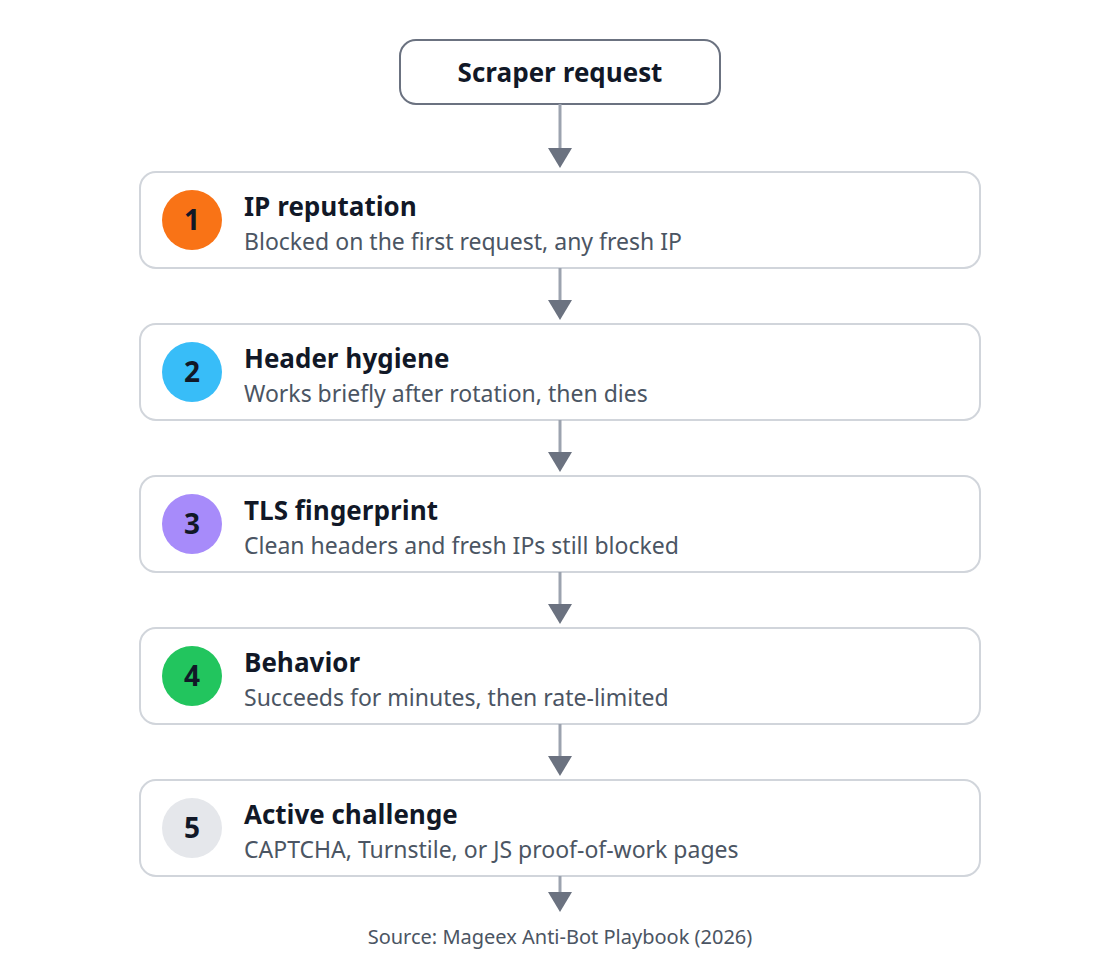
The rest of this post assumes Layers 1 and 2 are handled. If you have not set them up, start with our rotation guide, then the header fix, then return — Layers 3–5 below build on a clean foundation.
Layers 1–2 Recap: Rotation Plus Headers (15 Minutes)
Layer 1 is IP reputation. Multiple egress IPs may change address-based observations, but limits can also apply to accounts, sessions, or total activity — our Squid rotation guide shows three methods from per-user pinning to round-robin parents. If fresh IPs get blocked on the very first request, IP reputation is one possibility; authentication, URL policy, headers, TLS, or other rules may also explain the block. Check evidence before changing infrastructure.
Layer 2 is header hygiene. On supported versions, Squid can add or remove headers in ordinary HTTP requests. A normal HTTPS CONNECT tunnel is different: Squid cannot rewrite the encrypted application headers. RFC 9110 describes CONNECT tunneling. The linked header guide separates these cases; removing a header does not guarantee access or anonymity.
💡 Tip: Re-verify Layers 1–2 with the header-echo and egress-IP tests from those guides before touching anything below. Confirm the active configuration and observed traffic before inferring a more complex cause.
Layer 3: TLS and Browser Fingerprint
Here is the layer most rotation guides never mention. Your TLS handshake — cipher suite order, extensions, elliptic curves — fingerprints the client library before a single HTTP header is sent. Python requests through a perfectly rotated, header-clean proxy still shakes hands like Python requests, and some detection systems use TLS fingerprint signals alongside other evidence.
For an authorized diagnostic, compare the actual clients you use. Cloudflare documents JA3 and JA4 fingerprint signals. Matching one signal does not guarantee access. In ascending order of effort:
# This probes curl's TLS handshake, not your scraper's handshake.
curl --tlsv1.3 -s https://ja3er.com/json
** requests-level:** libraries like
curl-impersonateor Python'stls-clientmimic Chrome/Firefox handshakes. Drop-in for simple fetch loops.** Browser-level:** drive a real browser via Playwright's emulation primitives (device descriptors, userAgent, viewport) — genuine handshake, genuine rendering. Our Playwright vs Puppeteer comparison helps pick the tool.
** Never:** patching cipher lists by hand. Fragile, version-coupled, and obsolete the next browser release.
The analogy: Layers 1–2 changed your license plates and removed the bumper sticker; Layer 3 changes the engine sound. A guard who listens instead of looks needs the deeper disguise. A controlled comparison of clients can reveal a client-dependent difference, but it does not isolate TLS by itself: rendering, cookies, JavaScript, and request behavior may also change. Keep the diagnosis proportional to the evidence.
Layer 4: Behavior (Rate, Rhythm, and Manners)
A repetitive automated request pattern may differ from browsing behavior, but rate or regularity alone does not prove a client’s identity. Behavioral analysis watches tempo, coverage patterns, and session signals — and those signals may contribute to a decision alongside other checks.
# jittered delay between requests: human-ish tempo, not metronome
import random, time
time.sleep(random.uniform(1.5, 4.5))
Four rules cover most of it: jitter every delay (choose delays that respect the operator’s limits), vary crawl order (shuffle URL queues instead of sequential IDs), keep sessions coherent (one user agent + one IP + one cookie jar per session, the way a browser tab behaves), and respect robots.txt and crawl-delay as a starting courtesy — aggressive disregard is itself a signal.
⚠️ Warning: Headless-browser flags (
navigator.webdriver, missing plugins, zero-history profiles) are behavior-adjacent giveaways. If driving Playwright/Puppeteer, use headed or stealth-patched contexts with real profiles — browser automation may be detectable; changing the browser mode does not establish access or a specific cause.
Behavior is also where restraint pays most. Reducing request volume may help where rate is the issue;measure its effect before buying more capacity. Tune rate first, buy IPs second.
Layer 5: Challenges — CAPTCHA, Turnstile, and the Cost Math
When scoring fails to decide, targets escalate to interactive challenges: classic CAPTCHAs, Cloudflare Turnstile (a CAPTCHA alternative that can use non-interactive challenges), JS proof-of-work. A challenge may reflect configured rules or risk signals; it does not prove which earlier check failed or always require a manual human puzzle.
This is where the playbook draws its line. Third-party CAPTCHA-solving farms exist and technically work; their permissibility depends on the target’s terms, authorization, and applicable law, and turn a scraping project into an adversarial operation. This guide does not cover them, and you should think hard before going there.
Instead, do the cost math. Price three options honestly:
Official API or data product — often exists for exactly your use case (SERP APIs, Places API, product feeds). Check its licence, permitted uses, limits, and maintenance arrangements.
Managed scraping API — our scraping API comparison prices the vendors who absorb challenge-solving into their per-request fee. Worth it when engineering time costs more than requests.
Reduced scope — scrape less, slower, from allowed endpoints. The unglamorous option that keeps projects alive for years.
If challenges appear on a small fraction of requests, back off and retry later — a temporary challenge is not enough evidence to distinguish a rate limit, access policy, or other cause. If they appear on every request, review the target’s rules and access options rather than assuming the response proves an irreversible classification. Take the hint and switch options instead of escalating.
What This Guide Will Not Cover (The Line)
Public data, standard filtering, looking like a browser — in scope. The following are out of scope and stay out: bypassing authentication or paywalls, solving CAPTCHAs via human farms, forging credentials or tokens, exploiting site vulnerabilities, and ignoring explicit cease-and-desist or technical access revocation. Scraping legality (CFAA, ToS enforceability, robots.txt weight) deserves its own guide — it is next on our publishing plan — but the short version is: navigate the grey with counsel, not blog posts.
Decision Checklist: Which Layer Is Blocking You
Symptom | Hypotheses to investigate | Fix |
|---|---|---|
First request blocked on fresh IP | IP reputation, authentication, or URL policy | Check request and operator logs before changing infrastructure |
Works briefly after rotation, then dies | 2–3 — headers/fingerprint | Header fix, then TLS match |
Works for minutes, then rate-limited | 4 — behavior | Jitter, slow down, session coherence |
Challenge page on every request | 5 — challenges | Cost math: API vs managed vs reduced scope |
Everything blocked, all IPs, all clients | Undetermined from the response alone | Review access policy and official data options |
Work the table top to bottom. Check the evidence for each hypothesis before spending on additional infrastructure. These changes do not guarantee access. When access is denied, review authorization, reduce or stop the requests, and use an official API or other permitted data source where available.