Data Mining with Python: A Practical Approach to Extracting Insights
Cover Image

Key Takeaways- Modern data mining with Python uses an Arrow-native ecosystem where Pandas 2.2+, DuckDB, and Polars can reduce memory pressure for suitable workloads on a single machine.- Pandas 2.2+ with the PyArrow backend provides Arrow-backed nullable types and can reduce memory use; zero-copy exchange depends on compatible types and operations.- DuckDB operates as an in-process SQL OLAP engine directly over Parquet files, while Polars provides a multithreaded lazy streaming engine for datasets that exceed physical RAM.- Scikit-learn supports reproducible modeling downstream with pipelines that help prevent preprocessing leakage when fitted only on training data.
Data mining extracts actionable patterns, correlations, and anomalies from raw enterprise datasets to guide business strategy. Python is a practical option for this discipline, with expressive syntax and open-source tools for tabular analysis and machine learning.
The operational reality of data mining shifted significantly. Datasets can exceed available RAM, yet distributing computations across Spark or Ray clusters introduces steep infrastructure overhead, configuration complexity, and latency. Today, modern Python data mining relies on high-performance vectorized engines, Arrow-native columnar memory, and out-of-core query planners that execute multi-gigabyte analytics on a single workstation or server.
This guide provides an end-to-end practical architecture for data mining with Python, evaluating when to rely on optimized Pandas, when to switch to DuckDB or Polars, and how to construct machine learning pipelines that help prevent preprocessing leakage with Scikit-learn 1.5+.
The modern Python data mining architecture
A production data mining workflow consists of five distinct phases: ingestion, filtering and aggregation, feature transformation, pattern extraction, and model evaluation.
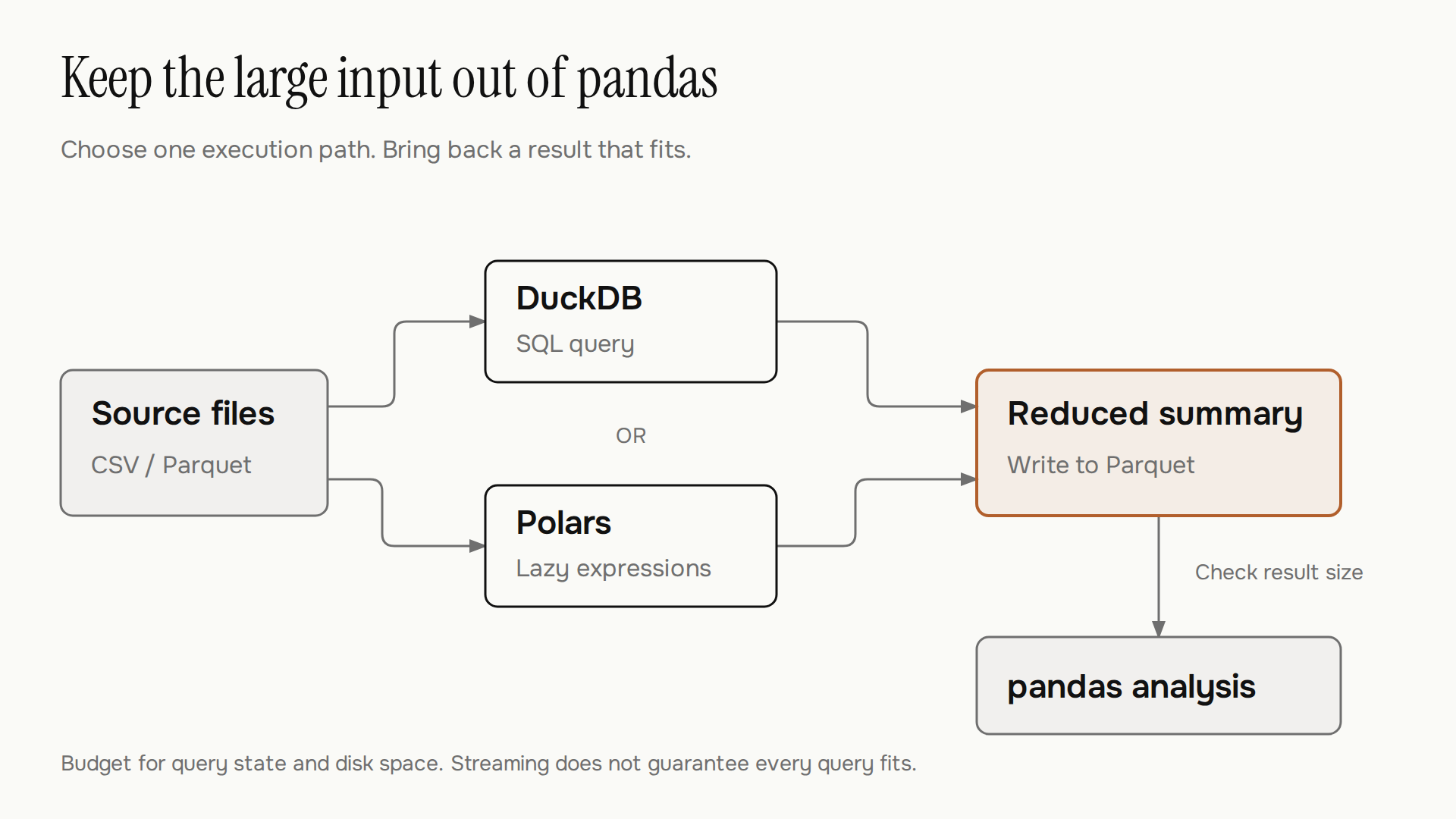
Modern Python data mining architecture: raw Parquet storage, vectorized pre-aggregation, and training-only preprocessing.
In traditional setups, engineers loaded full CSV dumps into memory using standard Pandas, performed ad hoc joins, and encountered catastrophic Out-Of-Memory (OOM) crashes. In modern pipelines:
Raw Storage: Raw transactions and events persist in columnar Parquet or Feather formats.
Heavy Filtering & Joining: In-process OLAP engines (DuckDB or Polars) can push down filters and projections to reduce the data read when the source format and query support it.
In-Memory Transformation: Cleaned subsets can transfer via Apache Arrow into Pandas or Polars, with zero-copy conversion where supported for exploratory visualization and domain-specific feature engineering. For structured workflows, see our guide on data cleaning with pandas.
Statistical Modeling: Scikit-learn estimators extract predictive signals, segment clusters, and compute feature importance.
In-memory optimization with Pandas 2.2+ and PyArrow
Pandas remains the most intuitive interface for interactive data exploration, hypothesis testing, and ad hoc feature manipulation. However, NumPy-backed pandas object columns can store strings as Python objects; missing-value behavior and copying depend on dtype and operation.
Starting with Pandas 2.0 and refined in Pandas 2.2+, Pandas introduced deep integration with Apache Arrow. By configuring the PyArrow backend, string columns consume compact Arrow string arrays rather than Python object pointers, and numeric columns support standardized bitmask nullability.
Enabling PyArrow in Pandas
You can select PyArrow-backed dtypes during supported file ingestion or convert columns explicitly:
import pandas as pd

# Ingest data using the PyArrow backend for native types
df = pd.read_parquet(
    "enterprise_events.parquet",
    engine="pyarrow",
    dtype_backend="pyarrow"
)

# Inspect memory consumption and Arrow dtypes
print(df.info(memory_usage="deep"))
By adopting dtype_backend="pyarrow", memory use depends on the data, dtypes, and operations; measure your own workload rather than assuming a fixed percentage saving. Furthermore, Arrow-backed data can interoperate with compatible tools such as Polars and DuckDB; conversions may allocate memory depending on types and the destination API. For deeper data shaping patterns, review our reference on data transformation with pandas.
In-process SQL analytics with DuckDB
When mining tasks require heavy aggregations, multi-table joins, or window functions across millions of rows, loading raw tables into Pandas DataFrames causes unnecessary memory bloat.
DuckDB solves this problem. It is an embedded, columnar SQL OLAP database engine that runs directly inside your Python process. DuckDB executes queries directly against Parquet files, CSVs, or Arrow memory buffers without setting up a database server or copying data to a proprietary storage format.
Querying Parquet files in-situ with DuckDB
DuckDB leverages pushdown projection (reading only selected columns) and pushdown filtering (evaluating WHERE clauses at the storage layer):
import duckdb

# Connect to in-memory DuckDB instance
con = duckdb.connect()

# Query compressed Parquet files directly without loading them fully
query = """
SELECT
    customer_segment,
    COUNT(transaction_id) AS total_orders,
    ROUND(AVG(order_amount), 2) AS avg_spend,
    ROUND(SUM(order_amount), 2) AS total_revenue
FROM 'data/transactions_*.parquet'
WHERE status = 'completed' AND transaction_date >= '2026-01-01'
GROUP BY customer_segment
HAVING total_orders > 100
ORDER BY total_revenue DESC
"""

# Return the aggregated result directly as a Pandas DataFrame
summary_df = con.execute(query).df()
print(summary_df.head())
DuckDB can skip columns and row groups when the query and Parquet metadata allow it, and can spill some intermediate results to disk. Runtime and peak memory depend on the query, hardware, and data; some workloads can still run out of memory. See DuckDB’s workload guidance.
Out-of-core processing and streaming with Polars
For complex data mining pipelines requiring feature creation, regex parsing, nested list manipulations, or rolling time-series calculations, SQL queries can become cumbersome.
Polars is a blazingly fast DataFrame library written in Rust. It features a vectorized query planner, multithreaded SIMD operations, and a native lazy execution engine (LazyFrame). With Polars LazyFrame, operations are queued into an execution graph that Polars optimizes before executing. Request streaming explicitly with collect(engine="streaming"). Supported operations run in batches, while unsupported parts can fall back to in-memory execution; collecting a large result still requires memory. See the Polars streaming guide.
Building a lazy data mining pipeline in Polars
import polars as pl

# Define the computation plan without executing immediately
lazy_plan = (
    pl.scan_parquet("data/customer_telemetry.parquet")
    .filter(pl.col("activity_count") > 5)
    .with_columns([
        (pl.col("total_session_seconds") / 3600).alias("session_hours"),
        (pl.col("interactions") / pl.col("total_session_seconds")).alias("interaction_rate")
    ])
    .group_by("user_tier")
    .agg([
        pl.len().alias("active_users"),
        pl.col("interaction_rate").mean().alias("mean_interaction_rate"),
        pl.col("session_hours").quantile(0.95).alias("p95_session_hours")
    ])
    .sort("mean_interaction_rate", descending=True)
)

# Execute the query plan with streaming enabled for out-of-core execution
result_df = lazy_plan.collect(engine="streaming")
print(result_df)
The query optimizer automatically prunes unused columns, reorders filter operations, and combines operations into parallel vectorized chunks.
Tool selection matrix: Pandas vs DuckDB vs Polars
Choosing the right library depends on dataset scale, the nature of transformations, and deployment targets:
Feature / Criteria | Pandas 2.2+ (PyArrow) | DuckDB | Polars |
|---|---|---|---|
Core Architecture | Eager, in-memory, Python/C/Arrow | Columnar vector execution, in-process C++ | Multithreaded Rust, lazy & eager engines |
Execution Paradigm | Eager imperative execution | Declarative vectorized SQL | Declarative expression API, Lazy graph |
Out-of-Core / Streaming | Manual chunking required | Larger-than-memory execution with disk spill for supported operations | Native streaming engine ( |
Memory Model | Apache Arrow & NumPy buffers | In-memory buffers & temp disk spill | Arrow-compatible columnar layout; zero-copy exchange depends on types and operations |
Best Used For | Ad hoc exploration, small/medium tabular EDA | Large file queries, aggregations, SQL joins | Complex feature pipelines, streaming datasets |
Integration | Matplotlib, Seaborn, Scikit-learn | Direct export to Arrow, Polars, Pandas | PyTorch, NumPy, Arrow IPC |
Predictive modeling with Scikit-learn 1.5+
Once data is cleaned, aggregated, and engineered, statistical modeling surfaces the underlying patterns. Scikit-learn remains the foundation of predictive machine learning in Python.
A critical risk during data mining is data leakage—allowing information from the validation or test splits to bias preprocessing steps such as imputation, scaling, or target encoding. Scikit-learn 1.5+ standardizes pipelines with robust ColumnTransformer architectures that help keep preprocessing within the training split when used correctly; they do not detect every form of leakage.
Building a preprocessing and modeling pipeline that helps prevent leakage
import numpy as np
from sklearn.model_selection import train_test_split
from sklearn.compose import ColumnTransformer
from sklearn.pipeline import Pipeline
from sklearn.impute import SimpleImputer
from sklearn.preprocessing import StandardScaler, OneHotEncoder
from sklearn.ensemble import HistGradientBoostingClassifier
from sklearn.metrics import classification_report

# Assume df is derived from our DuckDB or Polars pre-processing stage
X = df.drop(columns=["target_churn"])
y = df["target_churn"]

X_train, X_test, y_train, y_test = train_test_split(
    X, y, test_size=0.20, random_state=42, stratify=y
)

# Define column groups
numeric_features = ["session_hours", "interaction_rate", "total_spend"]
categorical_features = ["customer_segment", "acquisition_channel"]

# Preprocessing transformers
numeric_transformer = Pipeline(steps=[
    ("imputer", SimpleImputer(strategy="median")),
    ("scaler", StandardScaler())
])

categorical_transformer = Pipeline(steps=[
    ("imputer", SimpleImputer(strategy="constant", fill_value="missing")),
    ("onehot", OneHotEncoder(handle_unknown="ignore", sparse_output=False))
])

preprocessor = ColumnTransformer(transformers=[
    ("num", numeric_transformer, numeric_features),
    ("cat", categorical_transformer, categorical_features)
])

# Full modeling pipeline using modern HistGradientBoosting
pipeline = Pipeline(steps=[
    ("preprocessor", preprocessor),
    ("classifier", HistGradientBoostingClassifier(random_state=42))
])

# Fit on training data only and evaluate
pipeline.fit(X_train, y_train)
y_pred = pipeline.predict(X_test)
print(classification_report(y_test, y_pred))
Using HistGradientBoostingClassifier provides native support for missing values and integer-encoded categoricals, with performance depending on the data and estimator configuration.
Best practices for production data mining
To ensure your data mining jobs execute reliably in production pipelines:
Persist Intermediate Data as Parquet with ZSTD: Standardize on Parquet using Zstandard (
ZSTD) compression. Compare compression size and throughput for your workload before choosing it; compression trade-offs depend on the data and settings.Profile Memory Before Scaling Up: Use Python's built-in
tracemallocmodule to trace Python memory allocations, and monitor process memory as well: native library buffers may not appear in those traces.Decouple Query Filtering from Modeling: Perform heavy row filtering and joining upstream in DuckDB or Polars, and export only the modeling matrix (numerical arrays and encoded categoricals) into Scikit-learn. For automated workflows, explore our guide on AI-powered data pipeline automation.
Deepen Your Python Fundamentals: Mastering memory models, generators, and low-level data structures pays long-term dividends. Check out our curated list of advanced Python books for your next steps.
Frequently asked questions
When should I use DuckDB instead of Polars for data mining?
Choose DuckDB when your input data consists of raw files (Parquet, CSV, JSON) and your operations are naturally expressed as SQL queries, aggregations, and joins. Choose Polars when you need an expressive, functional DataFrame API, complex window functions, custom regex operations, or iterative feature engineering pipelines.
Does Pandas 2.2+ with PyArrow eliminate the need for Polars?
No. While the PyArrow backend significantly improves Pandas memory efficiency and string handling, Pandas generally uses eager execution; some backends and operations can use multiple threads. Polars provides a multithreaded query engine and streaming support for suitable workloads; benchmark the operations you need rather than assuming it is always faster.
How do I prevent memory errors when mining 50GB datasets on a 16GB laptop?
Do not read the full dataset into memory. Use DuckDB to filter and aggregate the data at the storage layer via SQL pushdown, or use Polars LazyFrame with collect(engine="streaming") to request streaming execution in batches. Check the physical plan: unsupported operations and a large collected result may still require substantial RAM.
What is the most effective file format for Python data mining?
Apache Parquet is the industry standard. It provides columnar compression, metadata statistics for column chunk pruning, and interoperability across Pandas, DuckDB, Polars, and Apache Arrow. Parquet is a compressed storage format; decoding it is distinct from zero-copy sharing of compatible in-memory Arrow buffers.